
How to Reduce Email Bounce Rate in 2026: A Developer's Guide
Learn how to reduce your email bounce rate in 2026 with proven developer techniques — from real-time email verification to list hygiene, SMTP checks, and API integration.
Email bounce rates are one of the most damaging — and most preventable — problems in email marketing and transactional email delivery. Whether you're running a SaaS signup flow, sending a campaign to 50,000 subscribers, or firing off order confirmations for your e-commerce store, a high bounce rate silently destroys your sender reputation, pushes your emails into spam, and costs you money on every failed send.
The good news: with the right tools and techniques, reducing your email bounce rate is entirely within your control. In this guide, we'll walk through exactly what causes email bounces, the difference between hard and soft bounces, and — most importantly — the practical steps developers and marketers can take to fix the problem in 2026.
45% of email senders say bounce rate is their #1 deliverability concern (2026 Email Benchmarks Report)
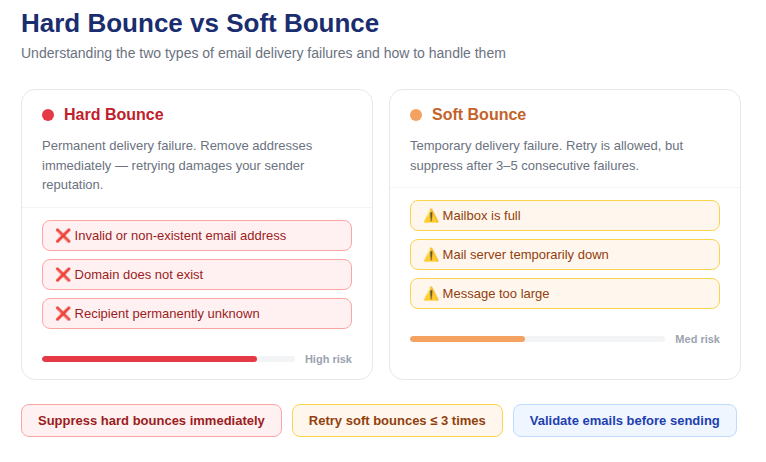
📷 Visual overview: hard bounce vs soft bounce comparison diagram
What Is an Email Bounce Rate?
Your email bounce rate is the percentage of emails in a send that fail to reach the recipient's inbox and are returned with an error. It's calculated simply:
Bounce Rate = (Number of Bounced Emails ÷ Total Emails Sent) × 100
Industry benchmarks for acceptable bounce rates in 2026:
· Below 2% — Healthy. Most ESPs will not flag your account.
· 2%–5% — Warning zone. You need to investigate and clean your list.
· Above 5% — Dangerous. Your sender reputation is actively being damaged.
· Above 10% — Critical. Many email service providers will suspend or throttle your account.
Hard Bounce vs Soft Bounce: What's the Difference?
Not all bounces are equal. Understanding the distinction between hard and soft bounces determines how you should respond to them.
Hard Bounces
A hard bounce is a permanent delivery failure. The email address does not exist, the domain is invalid, or the recipient's mail server has permanently rejected your sending domain. Hard bounces must be removed from your list immediately — sending to them again will accelerate reputation damage.
Common causes of hard bounces:
· The email address was typed incorrectly at signup (e.g. "gmial.com" instead of "gmail.com")
· The email account has been deleted or deactivated
· The domain no longer exists or has no valid MX records
· The recipient's server has permanently blacklisted your sending IP or domain
Soft Bounces
A soft bounce is a temporary delivery failure. The email address is valid, but delivery failed due to a transient condition — a full mailbox, a temporarily unavailable server, or a message that was too large. Soft bounces are worth retrying, but if an address soft-bounces repeatedly over time, treat it like a hard bounce.
💡 Developer Tip: Hard bounces should be suppressed after the first occurrence. Soft bounces should be retried 2–3 times before suppressing. Most ESPs handle this automatically, but if you're building a custom send pipeline, you'll need to manage this suppression list yourself.
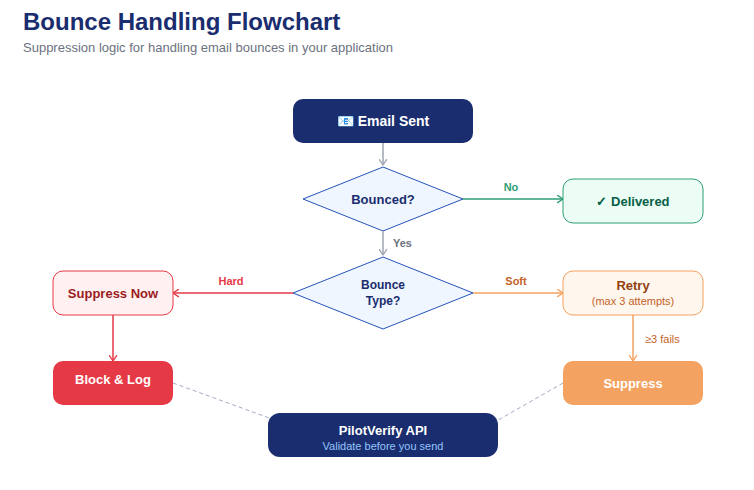
📷 Flowchart showing the bounce handling logic: hard bounce → immediate suppression, soft bounce → retry queue → suppress after 3 failures
Why Is Your Email Bounce Rate High? The 6 Most Common Causes
Before you can fix your bounce rate, you need to diagnose the root cause. Here are the six most common reasons bounce rates spike:
1. You're Not Validating Emails at the Point of Capture
The most common cause of high bounce rates is simple: bad emails entering your system from the start. Without real-time email verification at signup or import, typos, fake addresses, and disposable emails accumulate in your database. By the time you send a campaign, a significant portion of your list is already invalid.
2. Your List Is Old and Has Decayed
Email lists decay at approximately 22–25% per year. People change jobs, abandon old addresses, and switch email providers. A list you built two years ago without ongoing hygiene practices could have a quarter of its addresses already invalid. This is called list decay, and it's invisible until you hit send.
3. You're Using Purchased or Rented Lists
Purchased email lists are almost always a source of high bounce rates. These lists are rarely fresh, frequently contain invalid addresses, and carry the additional risk of including spam trap addresses — email addresses specifically set up by ISPs to catch senders using bought lists. Hitting a spam trap causes immediate, severe reputation damage.
4. No Double Opt-In Process
Single opt-in signup forms allow anyone to enter any email address — real or not. Double opt-in, where the subscriber must confirm their email by clicking a link in a confirmation email, automatically filters out fake addresses, typos, and people who entered someone else's email. It reduces list growth speed but dramatically improves list quality.
5. Sending to Catch-All Domains
Catch-all domains accept every email sent to them at the SMTP level — even to addresses that don't actually exist. This means your verification check passes, but the email later bounces (or goes nowhere). Identifying catch-all domains during verification is essential for accurate deliverability assessment.
6. Poor Sender Reputation or Missing Authentication
If your domain lacks SPF, DKIM, and DMARC records, receiving mail servers will be more likely to reject your emails outright. This creates bounce-like failures even when the email addresses themselves are valid. Authentication is a prerequisite for reliable deliverability in 2026.
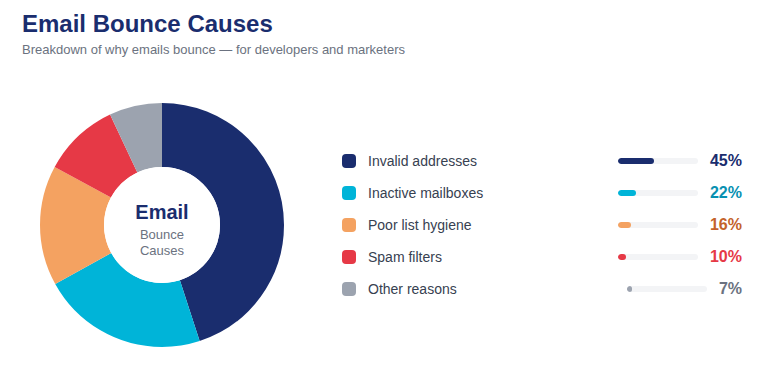
📷 Pie chart showing the percentage breakdown of common bounce causes: invalid emails 38%, list decay 24%, no validation 18%, catch-all domains 12%, other 8%
How to Reduce Email Bounce Rate: 8 Proven Techniques
1. Validate Emails in Real Time at the Point of Entry
The most effective way to prevent bounces is to stop invalid emails from entering your system in the first place. A real-time email verification API checks each address the moment it's submitted — at signup, import, or any other capture point — before it ever touches your database.
A good email verification API performs multiple checks simultaneously:
· Syntax validation — confirms the address follows proper email format (RFC 5322)
· MX record lookup — confirms the domain has active mail servers capable of receiving email
· SMTP verification — connects to the mail server to confirm the specific mailbox exists
· Disposable email detection — flags temporary email services like Mailinator or Guerrilla Mail
· Catch-all detection — identifies domains that accept all addresses regardless of validity
Implementation: PilotVerify's email verification API returns results in under 100ms — fast enough to validate inline during a form submission without any noticeable delay to the user. A single API call returns syntax status, MX validity, SMTP result, disposable flag, and catch-all flag in one JSON response.
2. Clean Your Existing Email List Before Every Campaign
Even with real-time validation in place going forward, your existing list needs a full audit. Run your entire list through a bulk email verification tool before your next send. This process — called email list cleaning — identifies and flags:
· Hard invalid addresses (non-existent mailboxes, dead domains)
· Role-based addresses (info@, support@, admin@) which have low engagement and high abuse rates
· Disposable and temporary email addresses
· Addresses associated with known spam traps
· Catch-all domains that should be treated as uncertain
Most verification tools, including PilotVerify, accept CSV uploads for bulk processing, making it straightforward to clean a list of any size.
3. Implement Double Opt-In for New Subscribers
Double opt-in is non-negotiable for list quality. Yes, you'll collect fewer email addresses — typically 20–30% fewer than single opt-in. But the addresses you do collect are confirmed valid, belong to real people who actually want your emails, and result in significantly higher open rates and lower bounce rates over time.
4. Set Up Proper Email Authentication (SPF, DKIM, DMARC)
Authentication doesn't directly prevent invalid email addresses, but it prevents your legitimate emails from being rejected by receiving servers that don't trust unauthenticated senders. In 2026, Google and Yahoo both require SPF and DKIM for bulk senders. Without them, your delivery rate suffers even for your valid addresses.
· SPF (Sender Policy Framework) — specifies which IP addresses are authorized to send email for your domain
· DKIM (DomainKeys Identified Mail) — adds a cryptographic signature to your emails that receiving servers can verify
· DMARC (Domain-based Message Authentication) — tells receiving servers what to do with emails that fail SPF/DKIM checks
5. Monitor and Suppress Bounced Addresses Immediately
Every email service provider gives you bounce data after a send. Hard bounces must be added to your suppression list immediately and never mailed again. If you're using a custom SMTP setup rather than an ESP, you need to parse bounce notification emails (DSNs) programmatically and maintain your own suppression list.
6. Segment and Sunset Inactive Subscribers
Inactive subscribers — people who haven't opened or clicked your emails in 6–12 months — are more likely to have abandoned their email address. Before each major send, run a re-engagement campaign for inactive contacts. Those who don't respond should be removed or suppressed.
7. Avoid Spam Trigger Words and Suspicious Send Patterns
Some bounces are caused by content filtering at the receiving server — your email triggers a spam filter before it even reaches the recipient's inbox. Avoid subject lines with excessive punctuation, all-caps text, or classic spam phrases. Additionally, sudden spikes in send volume look suspicious to ISPs. Warm up new IPs and domains gradually.
8. Monitor Your Sender Reputation Continuously
Tools like Google Postmaster Tools and Microsoft SNDS (Smart Network Data Services) give you direct visibility into how the major email providers perceive your sending domain. Keep an eye on your domain reputation score, spam rate, and authentication pass rates. A declining reputation score is an early warning sign before your bounce rate visibly spikes.
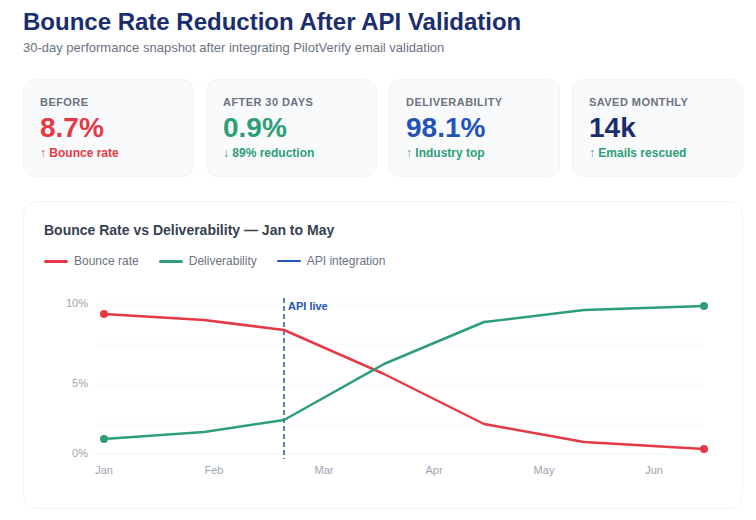
📷 Screenshot mockup of an email verification API dashboard showing bounce rate trend chart going from 8% down to 1.2% over 3 months after implementing validation
How to Measure the Impact of Your Bounce Rate Improvements
Once you've implemented these techniques, track the following metrics to measure your progress:
· Hard bounce rate — should drop below 0.5% within 1–2 send cycles after list cleaning
· Soft bounce rate — should reduce over time as repeat soft bouncers are suppressed
· Inbox placement rate — the percentage of emails that reach the inbox (not spam). Tools like GlockApps and Litmus offer inbox placement testing.
· Open rate — a higher open rate is a strong indirect indicator that your emails are reaching real, engaged inboxes
· Spam complaint rate — keep below 0.08% to stay within Google's 2026 bulk sender requirements
Benchmark: After a full list clean and real-time validation implementation, most senders see their bounce rate drop by 60–85% within the first two send cycles. The initial list clean typically removes 5–15% of addresses as invalid or high-risk.
Quick-Start: Real-Time Email Verification API (Code Example)
Here's a simple example of how to integrate real-time email verification into a Node.js signup form using the PilotVerify API:
// Node.js — Validate email before saving to database
const response = await fetch('https://pilotverify.net/api/validate', {
  method: 'POST',
  headers: {
  "Content-Type": "application/json",
  "x-api-key": "[YOUR_API_KEY]"
},
  body: "{\"email\": \"user@example.com\"}\n"
});

const result = await response.json();

if (result.status === 'invalid' || result.is_disposable) {
  return res.status(400).json({ error: 'Please enter a valid email address.' });
}
// Safe to proceed — save to database
This single check, performed at the point of signup, prevents invalid, disposable, and high-risk email addresses from entering your system. Combined with bulk list cleaning for your existing database, it forms a complete defence against email bounce rate problems.
Frequently Asked Questions (FAQ)
Q: What is a good email bounce rate in 2026?
A: A bounce rate below 2% is considered healthy by most email service providers. Aim to keep hard bounces below 0.5% and total bounces below 2%. Anything above 5% requires immediate action — list cleaning and validation implementation.
Q: What is the difference between a hard bounce and a soft bounce?
A: A hard bounce is a permanent delivery failure caused by an invalid address, deleted account, or dead domain. A soft bounce is a temporary failure, such as a full mailbox or unavailable server. Hard bounces should be removed immediately; soft bounces can be retried 2–3 times before suppressing.
Q: Can email verification eliminate all bounces?
A: Not entirely — but it eliminates the majority. Real-time email verification catches invalid syntax, non-existent mailboxes, disposable emails, and dead domains at the point of capture. It cannot prevent addresses that were valid when verified but later became inactive (list decay). Regular list cleaning addresses this.
Q: How often should I clean my email list?
A: At minimum, clean your list before every major campaign. For high-frequency senders, monthly cleaning is recommended. For lists that grow rapidly through signups, real-time verification at the capture point is more effective than periodic cleaning alone.
Q: Does email verification slow down my signup form?
A: With a good email verification API, no. PilotVerify returns results in under 100ms — imperceptible to users. The verification happens asynchronously as the user finishes typing or immediately on form submission, adding no noticeable delay to the user experience.
Q: What causes email bounce rates to spike suddenly?
A: Common causes of sudden bounce rate spikes include: sending to an old list that has decayed, importing a purchased list, a domain or IP getting blacklisted, missing email authentication (SPF/DKIM/DMARC), or a sudden dramatic increase in send volume that triggers spam filters.
Q: Is email list decay inevitable?
A: Yes — email list decay of 22–25% per year is normal and unavoidable. People change jobs, abandon addresses, and switch providers. The solution is a combination of real-time validation at capture, regular list cleaning, and re-engagement campaigns for inactive subscribers to remove or win back contacts before they become invalid.
Start Reducing Your Bounce Rate Today
A high email bounce rate is not a permanent problem — it's a data quality problem, and it's fully solvable. The combination of real-time email verification at the point of capture, regular bulk list cleaning, proper authentication, and suppression management will bring even the worst bounce rates under control.
PilotVerify gives you the tools to tackle all of the above: a fast, accurate email verification API for real-time checks, bulk CSV validation for existing lists, and usage analytics to track your progress over time.
✅ Try PilotVerify Free — Start validating emails today at pilotverify.net