Bulk Email Validation: The Complete Guide to Cleaning Your List Before Every Campaign
Discover how bulk email validation protects your sender reputation, slashes bounce rates, and maximizes campaign ROI. A complete, step-by-step guide for marketers and developers in 2026.
Every email marketer has been there. You've spent days crafting the perfect campaign — irresistible subject line, compelling copy, a call-to-action that converts. You hit send. And then the bounce notifications start rolling in. 8%. 12%. 15%.
Your ESP flags your account. Your sender reputation tanks. Your next campaign goes straight to spam — even for the subscribers who genuinely wanted to hear from you.
The root cause, almost every time, is a list that was never properly cleaned.
Bulk email validation is the process that prevents this exact scenario. It's how serious email marketers and development teams ensure that every address on their list is real, reachable, and worth sending to — before they spend a single credit on a campaign. In this guide, you'll learn exactly what bulk email validation is, why it matters more in 2026 than ever before, how the process works under the hood, and how to build a systematic list-cleaning workflow that protects your deliverability permanently.
60–85% average bounce rate reduction senders see after running bulk email validation combined with real-time verification at capture (2026 Email Deliverability Benchmarks)
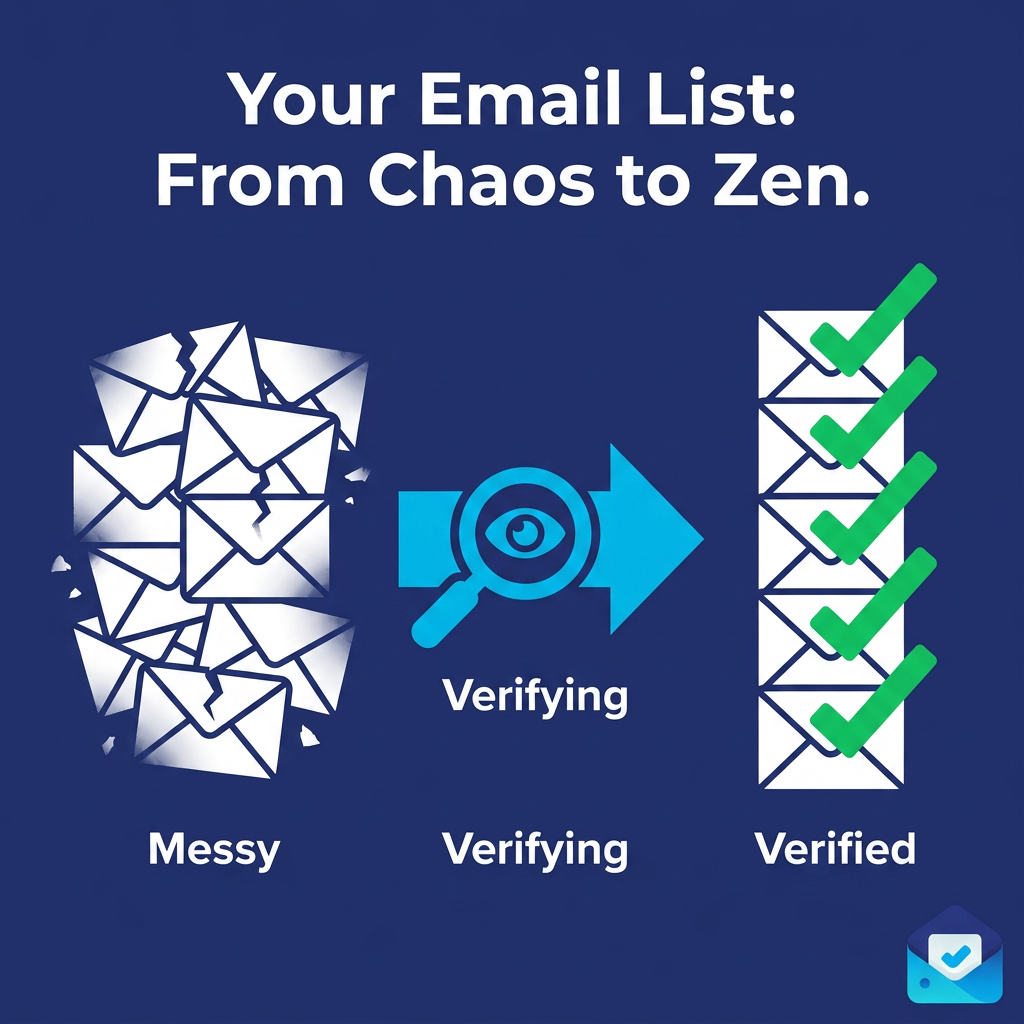
Visual overview: bulk email validation workflow — upload list, verify each address, download clean results
What Is Bulk Email Validation?
Bulk email validation is the automated process of verifying a large list of email addresses — hundreds, thousands, or millions at once — to determine which addresses are valid, which are invalid, and which carry deliverability risk before you send to them.
Unlike single-address verification (which checks one email at a time, usually at a point-of-entry like a signup form), bulk email validation operates on your existing list. You upload a CSV file containing your email addresses, and the validation engine runs each address through a series of multi-layer checks simultaneously. The result is a cleaned, categorized list you can act on immediately.
The output of a bulk validation typically segments your list into three categories:
· Valid — The address exists, the domain is active, and the mailbox is reachable. Safe to send.
· Invalid — The address does not exist, the domain is dead, or the format is incorrect. Remove immediately.
· Risky — The address may technically exist but presents elevated bounce or complaint risk. Includes catch-all domains, disposable emails, and role-based addresses. Use with caution or suppress.
The goal is simple: send only to Valid addresses and make an informed decision about Risky ones. Everything Invalid gets removed before you waste credits, damage your reputation, or trigger spam filters.
Why Bulk Email Validation Is Non-Negotiable in 2026
Email deliverability has never been more consequential — or more fragile. In 2026, Google and Yahoo both enforce strict bulk sender requirements, including SPF, DKIM, and DMARC authentication, and both actively monitor spam complaint rates. Exceed Google's spam complaint threshold of 0.08% and your delivery rates begin to collapse. Hit 0.3% and your sending domain can be permanently blacklisted.
Email service providers (ESPs) have also become more aggressive about protecting their own sending infrastructure. A bounce rate above 5% can trigger automatic account warnings. Above 10%, many ESPs will suspend or throttle your account entirely.
The uncomfortable reality is that email list decay is inevitable and relentless. Lists decay at approximately 22–25% annually. That means if you built a list of 50,000 subscribers two years ago and have never cleaned it, as many as 25,000 of those addresses may already be invalid — people who changed jobs, abandoned old accounts, or simply stopped using an email address. Without bulk email validation before each campaign, you're flying blind into deliverability damage.
Industry benchmarks for acceptable bounce rates in 2026:
· Below 2% — Healthy. Most ESPs will not flag your account.
· 2%–5% — Warning zone. You need to investigate and clean your list.
· Above 5% — Dangerous. Your sender reputation is actively being damaged.
· Above 10% — Critical. Many ESPs will suspend or throttle your account.
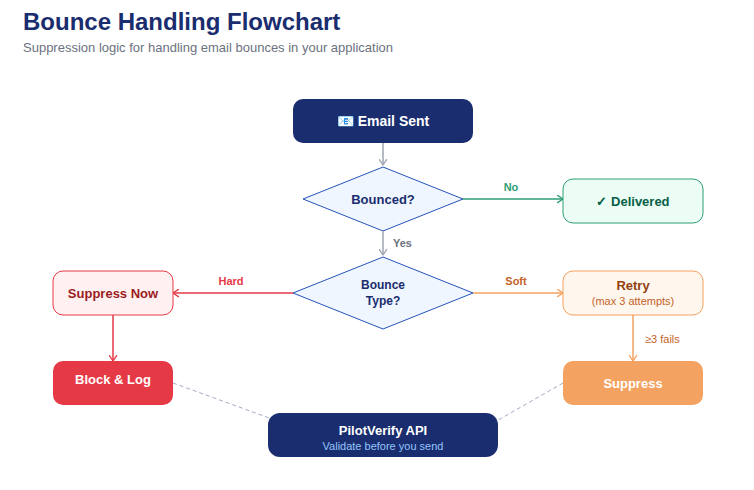
Diagram: the compounding effect of list decay over time without bulk email validation — and recovery after cleaning
How Bulk Email Validation Works: The 6-Layer Verification Process
Understanding what happens under the hood helps you interpret results intelligently and make smarter decisions about which addresses to suppress. A high-quality bulk email validation service runs each address through multiple sequential checks:
1. Syntax Validation
The first check is the most basic: does the email address follow the proper formatting rules defined in RFC 5322? This catches obvious errors — missing @ symbols, invalid characters, malformed domain extensions, and structurally impossible addresses like user@@domain..com.
Syntax errors are almost always the result of typos at the point of entry. They are hard invalids and should always be removed.
2. Domain and MX Record Lookup
Even a syntactically correct address can belong to a domain that simply doesn't exist or has no functioning mail infrastructure. The MX (Mail Exchange) record lookup checks whether the email's domain has active DNS records pointing to a mail server capable of receiving messages.
A valid syntax but missing MX record means the email can never be delivered, regardless of whether a mailbox exists. These are also hard invalids and should be removed immediately.
3. Disposable Email Detection
Disposable email services — Mailinator, Guerrilla Mail, Temp Mail, and hundreds of others — allow anyone to create a throwaway inbox in seconds. Users provide these addresses to bypass email-only signups while keeping their real inbox clean. Sending to disposable addresses is almost universally pointless; the inboxes are abandoned immediately after use.
A quality bulk email validation engine maintains an up-to-date database of known disposable email providers and flags any address from those domains as high-risk.
4. SMTP Mailbox Verification
This is the most powerful check in the stack. SMTP verification connects directly to the recipient's mail server and issues a probe — without actually sending an email — to confirm whether that specific mailbox exists. The server's response tells the validator whether the mailbox is real and active.
This is how bulk email validation catches addresses where the domain is perfectly valid but the specific account was deleted years ago. SMTP verification eliminates this entire class of invalid addresses that simpler tools miss entirely.
💡 Developer Tip: You can skip SMTP verification with skipSMTP: true in the PilotVerify API for faster checks when speed is more important than maximum accuracy. For pre-campaign list cleaning, always leave SMTP enabled.
5. Catch-All Domain Detection
A catch-all domain is configured to accept all incoming email at the SMTP level — even mail addressed to mailboxes that don't exist. This sounds like it would guarantee delivery, but in practice it means your emails often go into a black hole or are silently discarded after acceptance.
Bulk email validation flags catch-all addresses as "risky" rather than valid, because you cannot confirm individual mailbox existence on these domains. Your strategy for catch-all addresses depends on your risk tolerance — some marketers suppress them entirely before major campaigns, while others send to a test segment first and monitor bounce data carefully.
6. Role-Based Address Detection
Addresses like info@, support@, admin@, noreply@, and webmaster@ are associated with organizational functions rather than individual people. They typically have high complaint rates, low open rates, and are frequently monitored by spam filters. Many bulk email validation services flag these separately so you can make an informed suppression decision.
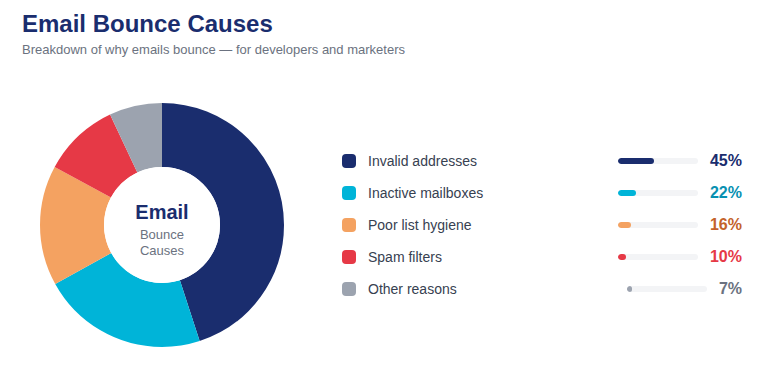
📷 Breakdown of invalid and risky address types found in a typical unvalidated email list
Building a Systematic Bulk Email Validation Workflow
The difference between marketers who consistently maintain healthy deliverability and those who suffer repeated deliverability crises almost always comes down to whether they have a systematic validation workflow — or are reacting to problems after they occur.
Step 1: Run a Full List Audit Before Your Next Send
If you haven't run bulk email validation on your entire list, do this before anything else. Export your full list from your ESP as a CSV, run it through a bulk validation service, and apply the results:
· Remove all Invalid addresses immediately and permanently
· Suppress or segment Risky addresses (disposable, catch-all, role-based)
· Retain Valid addresses for sending
For most senders who haven't cleaned their list recently, this initial audit will remove 5–20% of addresses. This is not a failure — it's discovering and eliminating a bounce rate problem before it destroys your sender reputation.
Step 2: Validate New Imports Before They Touch Your List
Every time you import a new batch of contacts — from a trade show, a webinar registration export, a CRM sync, or any other source — run that batch through bulk email validation before importing it into your ESP or database. This prevents new invalid addresses from contaminating a clean list.
This is especially critical for imported lists that didn't go through your own opt-in process, where address quality is entirely unknown.
Step 3: Add Real-Time Validation at Every Capture Point
Bulk email validation is your retrospective tool for existing lists. Real-time email verification via API is your forward-looking defense — it stops invalid addresses at the moment of entry. Together, they form a complete email hygiene system.
Implementation: PilotVerify's email verification API returns results in under 100ms — fast enough to validate inline during a form submission without any noticeable delay to the user. A single API call returns syntax status, MX validity, SMTP result, disposable flag, and catch-all flag in one JSON response.
Step 4: Set a Regular Cleaning Schedule
Even with real-time validation running at the point of capture, list decay continues. Build a recurring bulk email validation schedule based on your send frequency:
· High-frequency senders (daily/weekly): Monthly validation of the full active list
· Regular senders (bi-weekly/monthly): Quarterly validation, plus before every major campaign
· Occasional senders (a few times per year): Validation before every send, without exception
Step 5: Maintain and Honor Your Suppression List
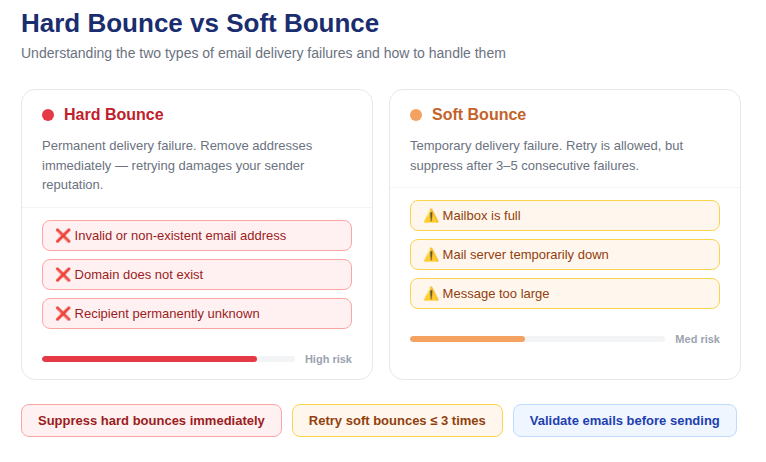
Bulk email validation gives you the data. Suppression is what you do with it. Every address identified as invalid should be immediately added to your ESP's suppression list and never mailed again. Most ESPs handle hard bounce suppression automatically, but for external validation-identified invalids, you need to import these suppressions manually. Never "try again" with a confirmed invalid address.
Quick-Start: Automating Bulk Validation via API (Code Example)
For developers who want to integrate bulk email validation programmatically into their send pipeline, here's how to loop through a list and filter to only sendable addresses using the PilotVerify API:
// Node.js — Validate a list of emails before campaign send
const emails = ['user@example.com', 'test@mailinator.com', 'info@company.com'];

async function validateList(emails) {
  const results = [];

  for (const email of emails) {
    const response = await fetch('https://pilotverify.net/api/validate', {
      method: 'POST',
      headers: {
        "Content-Type": "application/json",
        "x-api-key": "[YOUR_API_KEY]"
      },
      body: JSON.stringify({ email })
    });

    const result = await response.json();
    results.push({ email, ...result });
  }

  // Filter to only valid addresses before sending
  const sendable = results.filter(r => r.status === 'VALID');
  const suppressed = results.filter(r => r.status === 'INVALID');

  console.log(`Sendable: ${sendable.length} | Suppressed: ${suppressed.length}`);
  return sendable;
}

validateList(emails);
For large lists, use the CSV bulk upload via the PilotVerify dashboard or the batch API endpoint. Full documentation at docs.pilotverify.net.
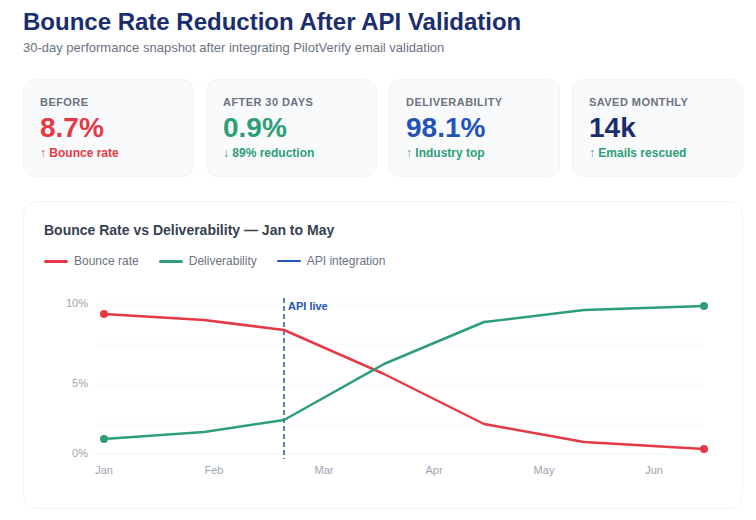
PilotVerify dashboard showing bulk validation results: bounce rate trend dropping from 8% to 1.2% after implementing validation
How to Measure the Impact of Bulk Email Validation
Once you've implemented bulk email validation, track these metrics to measure progress:
· Hard bounce rate — should drop below 0.5% within 1–2 send cycles after list cleaning
· Soft bounce rate — should reduce over time as repeat soft bouncers are suppressed
· Inbox placement rate — the percentage of emails that reach the inbox (not spam). Tools like GlockApps offer inbox placement testing.
· Open rate — a higher open rate is a strong indirect indicator that your emails are reaching real, engaged inboxes
· Spam complaint rate — keep below 0.08% to stay within Google's 2026 bulk sender requirements
Benchmark: After a full list clean and real-time validation implementation, most senders see their bounce rate drop by 60–85% within the first two send cycles. The initial list clean typically removes 5–15% of addresses as invalid or high-risk.
Frequently Asked Questions (FAQ)
Q: How many emails can I validate in one bulk run?
A: PilotVerify supports bulk CSV uploads of any size through the dashboard. Large lists can also be processed via the batch API endpoint for automated workflows with no volume ceiling.
Q: How long does bulk email validation take?
A: Small lists (under 10,000 addresses) typically process in seconds to a few minutes. Larger lists depend on SMTP verification depth, but modern validation infrastructure processes hundreds of thousands of addresses per hour.
Q: Does bulk validation cost the same per email as single verification?
A: Yes — with PilotVerify, one credit equals one email verification regardless of whether it's processed individually or in bulk. Credits never expire, so there's no penalty for running large validation batches.
Q: Can I automate bulk email validation as part of my send workflow?
A: Yes. PilotVerify's batch API endpoint allows you to trigger list validation programmatically, making it possible to build automated pre-campaign cleaning directly into your marketing operations stack.
Q: How often should I clean my email list?
A: At minimum, clean your list before every major campaign. For high-frequency senders, monthly cleaning is recommended. For lists that grow rapidly through signups, real-time verification at the capture point is more effective than periodic cleaning alone.
Q: Will bulk email validation eliminate all bounces?
A: Not entirely — but it eliminates the vast majority. Validation catches invalid syntax, non-existent mailboxes, disposable emails, and dead domains. It cannot prevent addresses that were valid when verified but later became inactive due to list decay. Regular cleaning closes this gap.
Q: Is email list data safe with a third-party validation service?
A: With PilotVerify, yes. Validation results are stored and encrypted at rest. Email addresses are auto-purged after 90 days. Your data is never sold or shared with third parties.
Q: What's the difference between bulk email validation and real-time email verification?
A: Bulk email validation processes an existing list of addresses all at once — it's your retrospective tool. Real-time verification checks a single address at the moment it's submitted, such as during signup. Both use the same underlying checks; they solve different parts of the list hygiene problem and work best when used together.
Start Cleaning Your List Today
Bulk email validation is not optional for any sender who cares about deliverability. It's the foundational practice that separates email programs with sub-2% bounce rates and strong inbox placement from those constantly fighting account suspensions and reputation damage.
The process is straightforward: export your list, run bulk email validation, apply the results, and send with confidence. Do it before every major campaign. Automate it where possible. Combine it with real-time validation at every point of entry. And repeat on a schedule.
PilotVerify gives you everything you need: multi-layer bulk validation with 99.6% accuracy, CSV upload for lists of any size, detailed reason codes for intelligent segmentation, pay-as-you-go credits that never expire, and enterprise-grade data privacy.
Try PilotVerify Free — Start validating emails today at pilotverify.net