Email Deliverability 101: Everything Marketers Need to Know
Bounces, spam filters, sender reputation, authentication — email deliverability is more than just hitting send. This complete marketer's guide breaks down every factor that determines whether your emails land in the inbox or disappear.
You write the perfect email. Subject line is sharp, copy is compelling, the offer is dialed in. You hit send. And then… nothing. Open rates are half what they should be. Clicks are flat. Revenue is nowhere near forecast.
The problem isn't your email. The problem is that most of it never reached the inbox.
Email deliverability is the discipline that determines whether your emails actually arrive where they're supposed to — in the inbox, visible to the recipient, ready to be opened. It's invisible when it's working and catastrophic when it isn't. And in 2026, with inbox providers enforcing tighter standards than at any point in email marketing history, understanding deliverability is no longer optional for marketers who want consistent results from their campaigns.
This guide covers every factor that affects email deliverability — from sender reputation and authentication to list hygiene and engagement signals — explained in plain language for marketers who need to understand the full picture, not just the surface-level advice.
21% of legitimate marketing emails never reach the inbox — they land in spam or are silently discarded before the recipient ever sees them (2026 Email Deliverability Benchmarks)
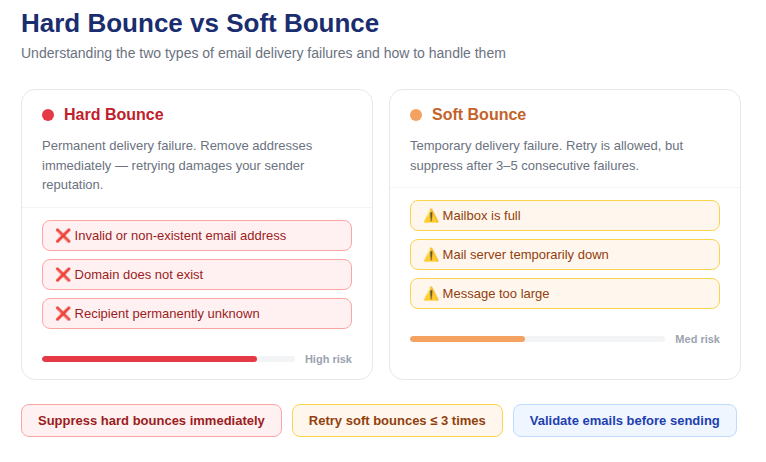
📷 Visual overview: the email deliverability ecosystem — from send to inbox, and all the gatekeepers in between
What Email Deliverability Actually Means
Email deliverability is not the same as email delivery. This distinction matters more than most marketers realize.
Email delivery means your email was accepted by the receiving mail server — it didn't hard-bounce, and it wasn't rejected outright. Delivery is a binary: accepted or not.
Email deliverability means your email reached the inbox — not the spam folder, not the promotions tab, not a filtering black hole. Deliverability is a spectrum, and it's influenced by dozens of signals that inbox providers evaluate in real time on every send.
You can have 99% delivery rate and 60% inbox placement rate simultaneously. The emails were accepted — they just went to spam. From a business outcomes perspective, this is nearly as bad as not sending at all. Recipients don't open spam folders for marketing email. Your campaign might as well not exist.
The goal of email deliverability optimization is inbox placement — getting your emails into the primary inbox of real, engaged subscribers so they have an actual chance of being opened and acted on.
How Inbox Providers Decide Where Your Email Goes
Every major inbox provider — Gmail, Outlook, Yahoo Mail, Apple Mail — runs its own proprietary filtering system that evaluates incoming email in real time and decides: inbox, promotions, spam, or reject. The signals these systems evaluate fall into several categories, and understanding them is the foundation of deliverability strategy.
Sender Reputation
Sender reputation is the single most important factor in email deliverability. It's a composite score — calculated at both the IP level and the domain level — that inbox providers use to assess how trustworthy you are as a sender. A strong sender reputation means your emails get the benefit of the doubt. A weak one means they start in a disadvantaged position before the content is even evaluated.
Your sender reputation is built and eroded by the signals your sending behavior generates over time:
· Bounce rate — high bounce rates signal poor list quality and damage reputation rapidly
· Spam complaint rate — recipients marking your emails as spam is the most damaging reputation signal. Keep it below 0.08%.
· Engagement rate — opens, clicks, replies, and forwards signal that recipients value your email, which positively reinforces reputation
· Unsubscribe rate — high unsubscribe rates signal list-audience mismatch
· Sending consistency — sudden volume spikes look suspicious; consistent, predictable sending patterns build trust
Email Authentication
Authentication is how inbox providers verify that the email claiming to come from your domain actually did. Without proper authentication, your emails are treated with suspicion regardless of your reputation. In 2026, Google and Yahoo require SPF and DKIM for all bulk senders. DMARC is increasingly expected as well.
The three authentication standards every marketer needs to understand:
· SPF (Sender Policy Framework) — a DNS record that lists which IP addresses are authorized to send email on behalf of your domain. If an email arrives from an IP not on your SPF record, receiving servers know it may be spoofed.
· DKIM (DomainKeys Identified Mail) — a cryptographic signature added to your emails that receiving servers verify against a public key published in your DNS. It confirms the email content hasn't been tampered with in transit and links the email to your sending domain.
· DMARC (Domain-based Message Authentication) — builds on SPF and DKIM by telling receiving servers what to do with emails that fail authentication checks: monitor (p=none), quarantine (p=quarantine), or reject (p=reject). DMARC also enables reporting, giving you visibility into who is sending email claiming to be from your domain.
List Quality
Inbox providers have become sophisticated at inferring list quality from sending behavior. A list with a high proportion of invalid addresses, inactive subscribers, and spam trap hits signals to ISPs that you're not maintaining proper hygiene practices. Even if your authentication is perfect, a dirty list will erode your reputation over time.
List quality signals that inbox providers monitor:
· Hard bounce rate per send
· Percentage of sends going to unknown users
· Spam trap hits (pristine traps and recycled traps)
· Overall engagement rate across the list
Content and Infrastructure Signals
While content filtering has become less dominant as a primary deliverability factor (reputation matters more in 2026), it still plays a role at the margin. Spam trigger words, excessive punctuation, misleading subject lines, and broken HTML can all contribute to spam classification — especially when combined with marginal reputation signals.
Infrastructure signals include your sending IP reputation, whether your IP is on known blacklists, your sending volume relative to historical patterns, and your email sending domain's age and history.
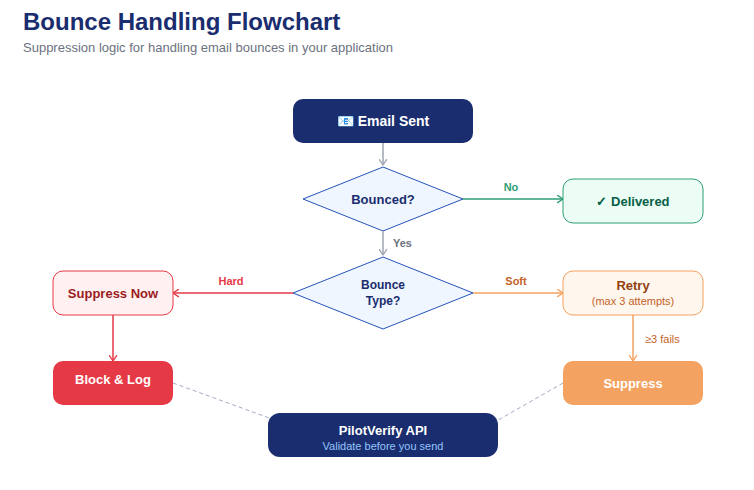
📷 How inbox providers evaluate incoming email: the multi-factor filtering decision tree from send to inbox placement
The 7 Factors That Most Directly Affect Your Email Deliverability
1. Bounce Rate
Your bounce rate is the most direct indicator of list quality — and one of the most visible signals inbox providers use to assess sender reputation. Hard bounces (permanent failures) must be suppressed after the first occurrence. Soft bounces (temporary failures) should be retried and suppressed after 3 consecutive failures.
The benchmark thresholds that matter:
· Below 2% — acceptable range
· 2%–5% — warning zone, clean your list immediately
· Above 5% — active reputation damage occurring
· Above 10% — ESP account suspension risk
The most effective way to keep bounce rate low is to prevent invalid addresses from entering your list in the first place — through real-time email verification at every capture point — and to run bulk email validation before every major campaign to catch addresses that have decayed since they were added.
2. Spam Complaint Rate
Every time a recipient clicks "Mark as Spam" on your email, it generates a complaint signal that inbox providers register against your sending domain. Google's current threshold for bulk senders is 0.08% — above this, delivery rates begin to decline. Above 0.3%, your domain can be permanently blacklisted.
Complaint rates are driven by: sending to people who don't remember subscribing, sending too frequently, sending irrelevant content, making unsubscribing difficult, and including disposable or role-based addresses that are monitored by compliance teams rather than real subscribers.
3. Sender Reputation Score
Your sender reputation isn't a single number you can look up — it's calculated independently by each inbox provider based on their own signals. However, you can get a proxy view through Google Postmaster Tools (which shows your domain reputation as High, Medium, Low, or Bad for Gmail delivery) and Microsoft SNDS (Smart Network Data Services) for Outlook.
Monitor these tools actively. A reputation score that's trending downward is an early warning sign of deliverability problems forming — visible before your open rates start to collapse.
4. Email Authentication Status
In 2026, failing SPF, DKIM, or DMARC checks is an automatic inbox placement penalty. Authentication is table stakes — it doesn't guarantee good deliverability on its own, but missing it guarantees degraded deliverability regardless of everything else you're doing right.
Check your authentication setup using free tools like MXToolbox or mail-tester.com. Run these checks whenever you change your ESP, add a new sending domain, or update your DNS records.
5. Engagement Rate
Gmail in particular uses engagement signals to classify email. If recipients consistently open, click, and reply to your emails, Gmail treats future sends favorably. If your emails are consistently ignored — not opened, not clicked, not forwarded — Gmail learns that your recipients don't want them and adjusts placement accordingly.
This creates a compounding effect in both directions: high engagement builds good deliverability, which increases inbox placement, which increases future engagement. Low engagement degrades deliverability, which reduces inbox placement, which further reduces engagement. Maintaining a clean, engaged list breaks the negative cycle before it starts.
6. List Hygiene
A clean list is the foundation of good deliverability. This means running regular bulk email validation to remove invalid and risky addresses, implementing real-time verification at every capture point, sunsetting chronically inactive subscribers, and maintaining a robust suppression list that covers hard bounces, unsubscribes, and spam complainants.
List hygiene isn't a one-time project — it's an ongoing operational practice. Email lists decay at 22–25% per year. A list that was clean twelve months ago has already lost a significant portion of its valid addresses to natural decay.
7. Sending Infrastructure
Where your email is sent from matters as much as what's in it. Your sending IP's reputation, whether you're on a shared or dedicated IP, your email sending domain's age, and your sending volume relative to your historical baseline all factor into deliverability.
For high-volume senders (1M+ emails per month), a dedicated sending IP warmed up properly is essential. For lower-volume senders, a reputable ESP's shared IP pool is generally fine — as long as the ESP maintains strict sender standards that prevent other senders on the pool from degrading the shared reputation.
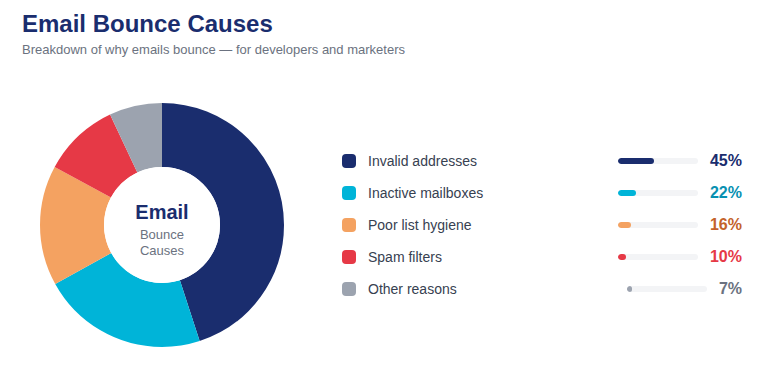
📷 Breakdown of the primary factors contributing to poor email deliverability in 2026
Email Deliverability Benchmarks for 2026
Knowing where you stand relative to industry benchmarks is the starting point for any deliverability improvement project. Here are the key metrics and the thresholds that define healthy vs. problematic performance:
· Inbox placement rate: 85%+ is healthy. Below 80% indicates a deliverability problem worth investigating. Below 70% is a serious issue.
· Bounce rate: Below 2% is acceptable. Below 0.5% is excellent. Above 5% requires immediate list cleaning.
· Spam complaint rate: Below 0.08% is required by Google for bulk senders. Below 0.01% is excellent.
· Open rate: Average varies by industry (20–35% for B2B, 15–25% for e-commerce) but consistent decline is the warning sign, not an absolute number.
· Unsubscribe rate: Below 0.5% per campaign is healthy. Above 1% suggests audience-content mismatch or frequency problems.
The Email Deliverability Improvement Playbook for Marketers
If your deliverability metrics are below benchmark — or you simply want to protect the good deliverability you have — here is the systematic improvement process, ordered by impact:
Step 1: Audit Your Authentication
Before anything else, confirm that SPF, DKIM, and DMARC are correctly configured for every sending domain you use. Use MXToolbox to check your SPF and DKIM records. Check your DMARC policy — if you're at p=none, consider moving to p=quarantine once your reporting data shows clean authentication pass rates.
This takes less than an hour and removes authentication as a variable from your deliverability analysis. If authentication is failing, nothing else matters until it's fixed.
Step 2: Clean Your List
Run your full active list through bulk email validation before your next send. PilotVerify processes your CSV and returns a segmented result: Valid, Invalid, and Risky. Import all Invalid addresses into your ESP suppression list immediately. Handle Risky addresses based on their specific reason code.
For most senders who haven't done this recently, this step alone will drop their bounce rate significantly on the next send — often by 60–85% compared to the previous campaign.
Step 3: Implement Real-Time Validation at Every Capture Point
Connect PilotVerify's real-time email verification API to every form where email addresses are collected. This prevents the list quality problem from rebuilding itself after you've cleaned it. The API returns results in under 100ms — invisible to users, highly effective at blocking invalid entries at the source.
Step 4: Segment and Suppress Inactive Subscribers
Subscribers who haven't opened or clicked in 12 months or more are dragging down your engagement rate and increasing your spam complaint and bounce risk. Run a re-engagement campaign for this segment. Those who don't respond should be removed from your active list before your next major send.
Step 5: Monitor Google Postmaster Tools
Set up Google Postmaster Tools for every sending domain you use. Monitor domain reputation, spam rate, and authentication pass rate weekly. Postmaster data is the closest thing to a direct line to Gmail's deliverability assessment — use it proactively rather than waiting for open rates to tell you there's a problem.
Step 6: Warm Up New IPs and Domains Correctly
If you're switching ESPs, adding a new sending domain, or moving to a dedicated IP, warm it up gradually. Start with small sends to your most engaged subscribers — people who regularly open and click. Increase volume progressively over 4–8 weeks. Inbox providers need to see a history of positive engagement before they'll extend trust to a new sending identity at volume.
Step 7: Review Your Content and Sending Cadence
Once your authentication, list quality, and reputation signals are in order, review your content and frequency. Are you sending too often for your list's expectations? Are your subject lines accurately representing the content inside? Is your unsubscribe process frictionless? Sending frequency that exceeds subscriber expectations is one of the fastest ways to generate spam complaints and erode the deliverability improvements you've worked to build.
Marketer Tip: Email deliverability improvement is not a one-time project. It's an operational practice. Authentication, list hygiene, engagement monitoring, and suppression management need to be built into your standard campaign workflow — not treated as a fire drill after a deliverability crisis.
How Email Validation Connects to Deliverability
Of all the factors that affect email deliverability, list quality is the one most directly in your control — and email validation is the tool that manages it.
Every invalid address on your list is a potential bounce. Every bounce weakens your sender reputation. Every weakened sender reputation reduces your inbox placement rate. Every reduced inbox placement rate means fewer opens, fewer clicks, and lower revenue from email — even from the subscribers who are perfectly valid and genuinely engaged.
The causal chain runs in both directions. Fixing list quality with bulk email validation and real-time verification breaks the negative chain and starts the positive one: lower bounces → stronger reputation → better inbox placement → more opens → higher engagement → further reputation reinforcement.
PilotVerify gives you both tools: real-time email verification API for point-of-capture validation, and bulk CSV validation for pre-campaign list cleaning. Together, they address both the upstream and downstream sides of the list quality problem.
Common Email Deliverability Myths Debunked
Myth: A High Open Rate Means Good Deliverability
Not necessarily. If 40% of your emails are going to spam, your open rate reflects only the 60% that reached the inbox. A campaign with 25% opens against a 60% inbox placement rate is actually underperforming relative to what it would achieve with full deliverability. Open rate is a downstream metric — inbox placement rate is the leading indicator.
Myth: Deliverability Problems Are Always Caused by Bad Content
Content is a minor factor in 2026 compared to reputation and list quality. The same email sent from a domain with strong reputation and clean list hygiene will land in the inbox. Sent from a domain with poor reputation and a dirty list, it will go to spam — regardless of how clean the content is. Fix the infrastructure before optimizing the copy.
Myth: Buying a New Domain Resets Your Deliverability
New domains start with no reputation — which is actually a disadvantage, not an advantage. Inbox providers treat unknown domains with heightened suspicion. A new domain requires a careful warm-up process and takes months to build the reputation that a well-maintained existing domain already has.
Myth: If Your Email Doesn't Bounce, It Was Delivered
As covered at the start of this guide: delivery ≠ deliverability. An accepted email can still end up in spam. Monitor inbox placement rate directly using tools like GlockApps or Litmus rather than relying on delivery confirmation alone.
Frequently Asked Questions (FAQ)
Q: What's the fastest way to improve email deliverability right now?
A: Run bulk email validation on your current list and remove all invalid addresses before your next send. For most senders, this produces the largest single-send improvement in bounce rate — which is the most direct driver of sender reputation and inbox placement. Confirm your authentication (SPF, DKIM, DMARC) is correct at the same time.
Q: How long does it take to recover from a deliverability problem?
A: Depends on severity. A minor bounce rate spike that's addressed quickly can recover in 2–4 sends of clean, low-bounce traffic. A blacklisted domain or severely damaged reputation can take 4–12 weeks of consistent clean sending to meaningfully recover — and some blacklist entries require manual delisting requests.
Q: Does unsubscribing hurt my deliverability?
A: Unsubscribes are much less damaging than spam complaints. An easy unsubscribe process is always better than a frustrated subscriber clicking "Mark as Spam." Make your unsubscribe link prominent and process it immediately — Google and Yahoo both require one-click unsubscribe for bulk senders in 2026.
Q: Is deliverability the same across all inbox providers?
A: No. Gmail, Outlook, Yahoo, and Apple Mail each run their own filtering systems with their own signals and thresholds. It's possible to have excellent Gmail deliverability and poor Outlook deliverability simultaneously. Segment your deliverability analysis by domain — look at open rates by recipient domain to identify which providers are giving you trouble.
Q: How does email validation help with spam complaint rate?
A: Disposable and role-based addresses are disproportionate sources of spam complaints — they're often monitored by compliance teams or used by people who never intended to receive marketing email. Removing them via bulk email validation before each send reduces the pool of likely complainants and directly lowers your complaint rate over time.
Q: What tools should I use to monitor my email deliverability?
A: Google Postmaster Tools (free, Gmail-specific), Microsoft SNDS (free, Outlook-specific), MXToolbox (authentication and blacklist checks), GlockApps (inbox placement testing across multiple providers), and your ESP's built-in bounce and complaint reporting. Use at least two of these consistently.
Email Deliverability Is Not Set and Forget
Every element of email deliverability — sender reputation, authentication, list quality, engagement signals, infrastructure — requires active, ongoing attention. It degrades when neglected and improves when managed systematically.
The marketers who consistently achieve strong inbox placement rates are not the ones with the most creative campaigns or the highest sending frequency. They're the ones who treat deliverability as operational infrastructure: maintaining clean lists, authenticating properly, monitoring reputation proactively, and building engagement-focused email programs that ISPs learn to trust over time.
PilotVerify gives you the list quality foundation that the rest of your deliverability strategy depends on — real-time validation at the point of capture, and bulk email validation before every campaign, with 99.6% accuracy and results in under 100ms.
Try PilotVerify Free — Protect your deliverability starting today at pilotverify.net