How to Improve Email Deliverability Without Changing Your Content
Your email content isn't the problem. Sender reputation, list quality, and authentication are. Here's how to improve email deliverability without touching a single word of your copy.
When email deliverability drops, the instinct is usually to blame the content. Too many images. Spam trigger words in the subject line. HTML that doesn't render cleanly. So the team rewrites the email. The designer rebuilds the template. The copywriter tests new subject lines. And the deliverability problem persists — because the copy was never the issue.
In 2026, content filtering is a secondary factor in inbox placement decisions. The primary factors are sender reputation, list quality, and authentication — and all three can be fixed without changing a single word of your email copy.
This guide is for marketing teams whose deliverability has slipped and who need to fix it systematically, not just tinker with subject lines and hope for a different result. Every technique in this guide addresses a root cause of poor deliverability that has nothing to do with your content — and each one produces measurable improvement in inbox placement rate when implemented correctly.
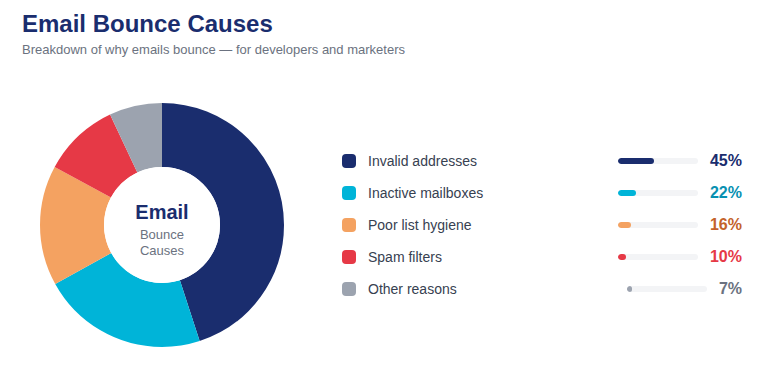
80% of email deliverability problems stem from sender reputation and list quality issues — not email content (2026 Deliverability Research Report)
📷 The real levers of email deliverability: reputation, list quality, and authentication — not copy or design
Why Content Is Not Your Deliverability Problem
To understand why content is rarely the primary deliverability lever, you need to understand how modern inbox filtering actually works.
Inbox providers like Gmail and Outlook no longer rely primarily on content-based spam detection — the approach dominant in the early 2000s where "FREE!!!" in the subject line meant automatic spam classification. Modern filtering is reputation-based and behavior-based. The provider looks at who is sending, what their sending history looks like, how recipients have responded to their previous emails, and whether their infrastructure signals match those of a legitimate sender.
Content is evaluated, but it's weighted far less heavily than reputation signals. The same email — identical content, identical template, identical subject line — will land in the inbox consistently from a sender with strong reputation and a clean list. It will go to spam consistently from a sender with weak reputation and a dirty list. The content is identical. The deliverability outcome is completely different.
This is why content optimization, in isolation, rarely fixes a deliverability problem. You're tuning the wrong variable.
Fix 1: Clean Your Email List Before Your Next Send
Of all the non-content fixes available, list cleaning produces the most immediate and measurable impact on deliverability. Here's the mechanism:
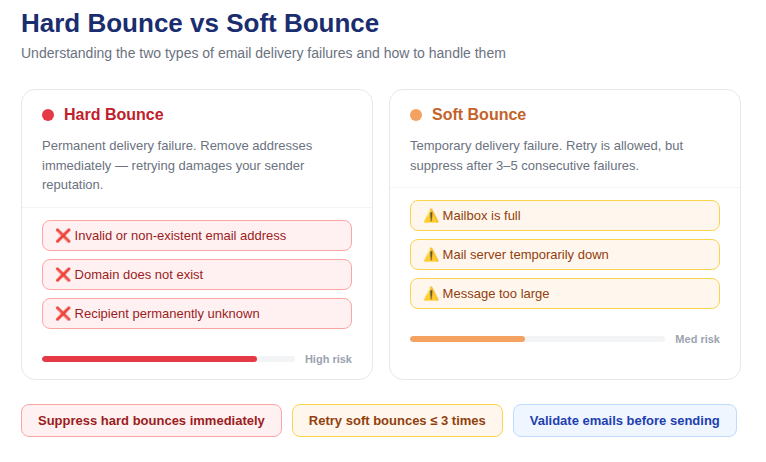
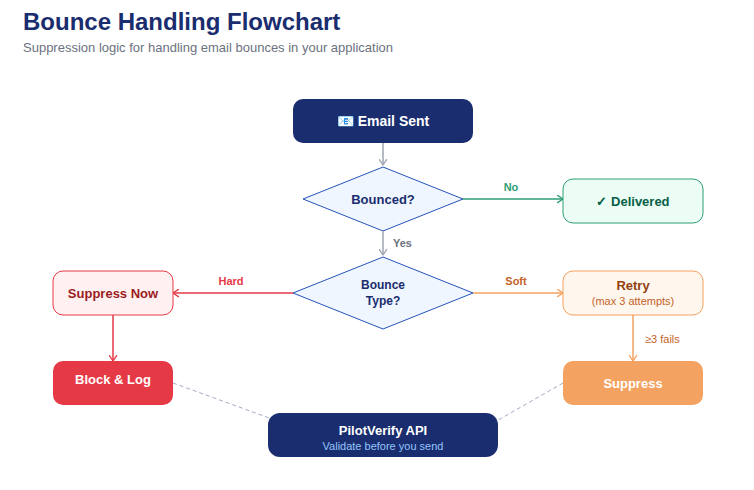
Invalid addresses on your list generate hard bounces when you send to them. Hard bounces signal to inbox providers that you're maintaining poor list hygiene. Poor list hygiene signals are weighted heavily in reputation scoring. Lower reputation → worse inbox placement → lower opens → further reputation decline.
Running bulk email validation on your list before sending breaks this chain at the source. By removing invalid addresses before the send, you eliminate the bounce signals, protect your reputation, and let the positive signals (opens, clicks, engagement from your valid subscribers) dominate the reputation calculation instead.
What bulk email validation removes from your list:
· Non-existent mailboxes — addresses where the account has been deleted or never existed (caught via SMTP mailbox verification)
· Dead domains — addresses on domains with no active mail servers (caught via MX/DNS lookup)
· Syntax errors — malformed addresses that will always bounce (caught via syntax validation)
· Disposable addresses — throwaway inboxes that generate zero engagement and elevated complaint risk
· Catch-all addresses — domains that appear valid but may silently discard your email after acceptance
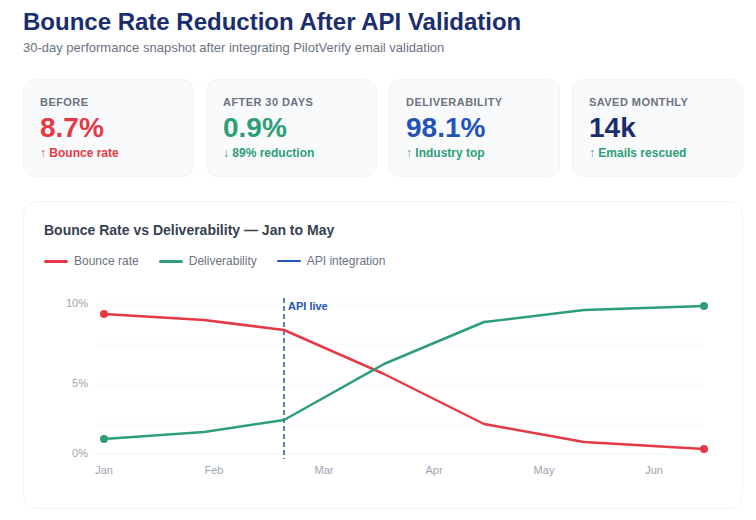
PilotVerify processes your entire list via CSV upload and returns results segmented as Valid, Invalid, and Risky — with specific reason codes for every flagged address. Import Invalid addresses into your ESP suppression list before scheduling your next campaign. The bounce rate on your next send will reflect the cleaned list, not the previous one — and the improvement is typically 60–85% compared to the pre-cleaning baseline.
Best Practice: Run bulk email validation within 30 days of your intended send date. List decay is continuous — addresses that were valid 6 months ago may already be invalid today. The closer your validation is to your actual send, the more accurately it reflects current deliverability.
Fix 2: Audit and Correct Your Email Authentication
Authentication failures are a silent deliverability killer. They don't generate obvious error messages — your emails still send, they just get treated with suspicion by every inbox provider on the receiving end.
In 2026, Google and Yahoo require all bulk senders to have valid SPF and DKIM configured. DMARC is increasingly required and universally expected. If any of these are missing or misconfigured, you're operating at a permanent deliverability disadvantage that has nothing to do with your content.
How to Check Your Authentication Status Right Now
Send a test email from your sending domain to a Gmail address you control. In Gmail, open the email and click the three-dot menu → "Show original." Look for the following in the email headers:
· SPF: PASS — means your sending IP is authorized by your SPF record
· DKIM: PASS — means the email signature validates correctly against your domain's public key
· DMARC: PASS — means the email aligns with your DMARC policy
If any of these show FAIL or SOFTFAIL, stop everything and fix authentication before your next send. MXToolbox (mxtoolbox.com) provides free tools to check and diagnose SPF, DKIM, and DMARC records for any domain.
Common Authentication Misconfigurations
· SPF record includes too many DNS lookups — SPF has a hard limit of 10 DNS lookups. If your record triggers more than 10, it fails. This happens when you add multiple ESPs and marketing tools to your SPF record over time without cleaning up old entries.
· DKIM key rotation not managed — DKIM keys should be rotated periodically (every 6–12 months). Old keys that remain in DNS after rotation don't cause failures, but unmanaged key configurations are a common source of confusion when troubleshooting.
· DMARC at p=none indefinitely — p=none is the right starting point while you're reviewing DMARC reports, but it means your policy has no enforcement. Move to p=quarantine or p=reject once your authentication pass rates are consistently high.
· Sending from a subdomain without its own SPF/DKIM — if you send from marketing.yourdomain.com but your SPF and DKIM are configured only for yourdomain.com, authentication may fail. Each sending subdomain needs its own records.
📷 Authentication check flowchart: SPF → DKIM → DMARC — how each layer builds on the previous one
Fix 3: Suppress Inactive Subscribers Before They Become a Problem
Engagement rate is a direct input into inbox placement decisions at Gmail and other major providers. A high proportion of subscribers who consistently ignore your emails signals low relevance and erodes your deliverability — without generating a single bounce or complaint.
The fix is subscriber sunsetting: identifying contacts who haven't engaged in a defined window (12 months is the standard starting point), running a re-engagement campaign for that segment, and removing those who don't respond from your active list before they continue dragging down your engagement metrics.
A Simple Sunsetting Workflow
· Identify: Pull all subscribers with no opens or clicks in the past 12 months from your ESP
· Re-engage: Send 2–3 re-engagement emails over 3 weeks with a simple, direct message: "We've noticed you haven't opened our emails in a while. Still want to hear from us?" Include one-click options to stay subscribed or unsubscribe.
· Suppress: Anyone who doesn't open or respond to the re-engagement sequence gets suppressed — not deleted, but moved to an inactive segment that doesn't receive regular campaigns.
· Repeat: Run this process quarterly or before every major campaign for subscribers who have lapsed since the last cycle.
Removing chronically inactive subscribers reduces your list size but increases your engagement rate on every subsequent send — which inbox providers register as a positive reputation signal.
Fix 4: Stop Sending to Role-Based and Shared Addresses
Role-based email addresses — info@, support@, contact@, admin@, sales@, noreply@ — are among the most reliable sources of spam complaints in marketing email programs. They're not monitored by a single engaged individual. They're managed by teams, filtered by support tools, or routed to compliance departments that view marketing email as noise.
Including role-based addresses in your marketing sends creates spam complaints from people who never personally opted in, low engagement that drags down your sender reputation, and potential interactions with spam monitoring systems run by inbox providers.
Bulk email validation via PilotVerify flags role-based addresses specifically, so you can identify and suppress them across your entire list before your next campaign — without changing a single element of your email content.
Fix 5: Add Real-Time Email Verification at Every Capture Point
Everything above addresses existing list quality problems. Real-time email verification addresses the upstream problem: preventing bad addresses from entering your list in the first place.
Every invalid address that enters your list through an unvalidated form is a future bounce waiting to happen. Every disposable address is a future non-engager that will dilute your engagement metrics. Every typo address is a missed connection with someone who may have genuinely wanted to subscribe.
Connecting PilotVerify's email verification API to your signup forms, landing pages, checkout flows, and any other email capture point creates a continuous filter — valid addresses pass through, invalid and disposable ones are blocked at submission with a user-facing prompt to correct the entry.
The API returns results in under 100ms, making the validation invisible to users who enter valid addresses (the vast majority). For users who enter invalid addresses, the immediate feedback is actually a better experience than submitting successfully and then wondering why they never received the confirmation email.
Fix 6: Monitor and Manage Your Sending Reputation Proactively
You cannot manage what you don't measure. Most senders only discover they have a reputation problem when open rates collapse — which is a lagging indicator. By then, the damage has been accumulating for weeks.
Set up proactive reputation monitoring with these free tools:
· Google Postmaster Tools (postmaster.google.com) — monitor your domain reputation score, spam rate, and authentication compliance for Gmail deliverability. Set this up for every sending domain and check it weekly.
· Microsoft SNDS (sendersupport.olc.protection.outlook.com) — equivalent visibility for Outlook/Hotmail deliverability
· MXToolbox Blacklist Check — checks your sending IP and domain against major public blacklists. Run this after any bounce rate spike to confirm you haven't been added to a blacklist.
If Google Postmaster Tools shows your domain reputation as Low or Bad, do not increase sending volume. Clean your list first, suppress inactive subscribers, fix any authentication issues, and send only to your most engaged subscribers for 2–4 weeks to rebuild positive reputation signals before returning to full volume.
📷 Reputation recovery timeline: the sequential steps from damaged reputation back to healthy inbox placement
Fix 7: Review Your Sending Frequency and Volume Patterns
Sudden spikes in sending volume are a deliverability red flag — even when your list is clean and your authentication is perfect. Inbox providers are tuned to detect abnormal sending patterns because they're a common characteristic of compromised accounts and spam operations.
If you normally send 20,000 emails per week and you send 200,000 in a single day, expect increased spam classification on that send — regardless of content. The pattern itself is suspicious.
Best practices for volume management:
· Increase sending volume gradually — no more than 2–3x your established baseline in any single send
· If you need to send a large one-time campaign significantly above your normal volume, stagger it across multiple days
· Maintain a consistent sending schedule — irregular sending (nothing for 3 months, then a huge blast) is harder on deliverability than consistent low-frequency sending
Fix 8: Implement One-Click Unsubscribe (Required in 2026)
Google and Yahoo both require one-click unsubscribe for bulk senders in 2026. This means your unsubscribe process must complete with a single click — no confirmation pages, no re-entry of the email address, no multi-step friction. Non-compliance can result in deliverability penalties independent of your other sender metrics.
Beyond compliance: a frictionless unsubscribe process reduces spam complaints. When subscribers who no longer want your emails can't easily unsubscribe, they click "Mark as Spam" instead. Spam complaints are far more damaging to deliverability than unsubscribes. Make unsubscribing easy, and you're actively protecting your sender reputation.
The Non-Content Deliverability Improvement Checklist
Run through this checklist before every major campaign — without touching your email copy:
· ✅ Run bulk email validation — remove all Invalid addresses, suppress Risky by reason code
· ✅ Verify SPF, DKIM, and DMARC are passing for all sending domains
· ✅ Suppress role-based addresses from marketing sends
· ✅ Check your domain reputation in Google Postmaster Tools
· ✅ Run MXToolbox blacklist check on your sending IP and domain
· ✅ Confirm hard bounces and spam complaints from previous sends are suppressed
· ✅ Exclude subscribers with no engagement in 12+ months from major sends
· ✅ Verify one-click unsubscribe is functional in your email template
· ✅ Confirm your send volume is within 2–3x of your established baseline
Marketer Tip: Build this checklist into your campaign launch process — not as a pre-publish gate that slows things down, but as a standard workflow step that happens in parallel with content review. Most of these checks take minutes. The deliverability protection they provide lasts for the lifetime of the campaign and beyond.
📷 Campaign pre-send deliverability dashboard: authentication status, list quality score, and reputation signal overview
How Long Before You See Results?
The timing of deliverability improvements depends on which fix you're implementing and how damaged your current metrics are:
· Bulk email validation: Immediate — your next send reflects the cleaned list. Bounce rate improvement visible on send 1.
· Authentication fixes: Immediate after DNS propagation (typically 24–48 hours). Deliverability improvement visible on next send after propagation.
· Inactive subscriber suppression: Engagement rate improvement visible within 1–2 sends. Reputation improvement follows over 3–6 subsequent sends.
· Reputation recovery (if currently Low/Bad): 4–12 weeks of consistent clean sending to meaningfully improve reputation score. There is no shortcut — recovery requires time and a track record of positive signals.
· Real-time verification at capture: No visible delivery improvement immediately (it prevents future decay), but bounce rates stabilize at lower baseline levels within 2–3 months as the cleaned input reflects in the active list.
Frequently Asked Questions (FAQ)
Q: My content team insists the deliverability problem is the email design. How do I prove it's not?
A: Send the exact same email to two segments — one that's been through bulk email validation and active subscriber filtering, one that hasn't. Compare inbox placement rates using a tool like GlockApps before and after. The data will show the improvement came from list quality, not design changes.
Q: Can I improve deliverability without reducing my list size?
A: The invalid addresses that need to be removed cannot be retained and have good deliverability simultaneously — they are, by definition, undeliverable. However, you can maintain list size growth by improving capture quality with real-time verification, which ensures new subscribers replacing the removed invalids are genuine and deliverable.
Q: Does switching ESPs improve deliverability?
A: Rarely by itself. If your ESP's shared IP pool is genuinely compromised by other senders, switching can help. But if the problem is your list quality, authentication, or engagement rate, those problems follow you to the new ESP. Fix the root causes before migrating — otherwise you'll have the same deliverability issues on the new platform, plus the disruption of migration.
Q: How often should I run bulk email validation on my list?
A: At minimum before every major campaign. For high-frequency senders (weekly or more), monthly validation of the full active list is recommended. For any sender who has imported contacts from external sources recently, validate those imports before they're included in a send.
Q: Is it possible to have good deliverability without double opt-in?
A: Yes — but it requires more active list hygiene. Double opt-in naturally filters invalid and fake addresses at signup. Without it, those addresses enter your list and need to be caught by real-time email verification at the API level or removed via bulk validation before sends. The end goal (a clean, valid list) is the same — the method to achieve it differs.
Stop Rewriting. Start Fixing.
The next time your email deliverability slips, resist the reflex to blame the copy and start rewriting. Check your authentication. Clean your list. Suppress your inactives. Monitor your reputation. These are the variables that actually control where your emails land — and every one of them can be improved without changing a single word of your content.
PilotVerify gives you the list quality foundation that anchors the rest of your deliverability strategy — bulk email validation before every campaign, real-time verification at every capture point, and 99.6% accuracy on every check.
Try PilotVerify Free — Fix your deliverability from the root at pilotverify.net