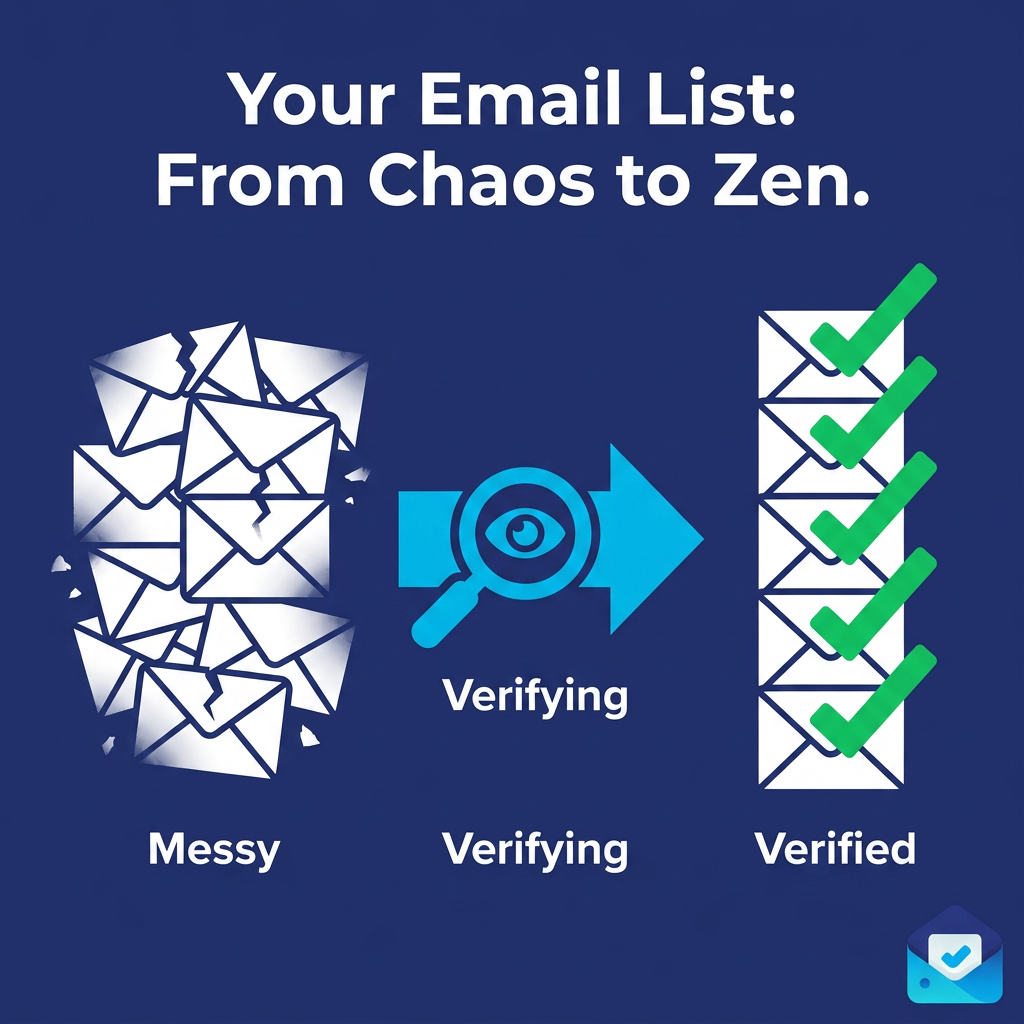
How Bulk Email Validation Can Cut Your Bounce Rate in Half Overnight
A high bounce rate doesn't have to be a long-term problem. Here's how bulk email validation can cut your bounce rate in half overnight — and keep it there for every campaign after.
A 9% bounce rate. That's what one send can do to a list that hasn't been cleaned in eighteen months. Nine out of every hundred emails — bouncing, failing, generating negative signals with every major inbox provider, chipping away at a sender reputation that took years to build.
The frustrating part? It's almost entirely preventable. And it's fixable faster than most senders realize.
Bulk email validation is the single highest-impact action you can take to reduce your bounce rate — not gradually, not over months of careful list management, but before your very next send. When you run your list through a proper bulk email validation process, remove the invalid addresses, and send only to verified contacts, your bounce rate drops immediately and dramatically. For many senders, that drop is 60%, 70%, even 85% compared to their previous send.
This guide walks you through exactly how that happens, why bounce rates spike in the first place, and what a complete bulk email validation workflow looks like in practice — so you can replicate those results on your list.
5–15% of addresses in a typical unvalidated email list are already invalid — invisible until your bounce rate spikes mid-campaign
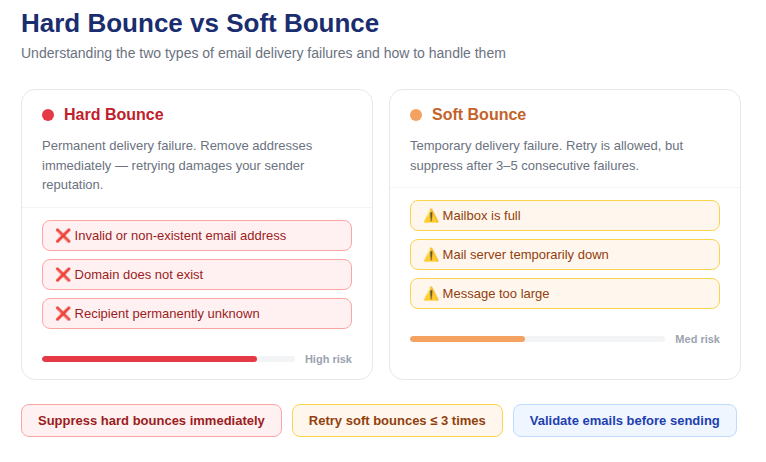
📷 Hard bounce vs soft bounce — understanding the difference is the first step to fixing your rate
Understanding Your Bounce Rate Problem
Before you can fix a bounce rate problem, you need to understand what's actually causing it. Not all bounces are the same, and not all of them respond to the same solution.
Hard Bounces: The Ones That Damage Your Reputation
A hard bounce is a permanent delivery failure. The email address does not exist, the domain has no active mail server, or the receiving server has permanently rejected your sending domain. Hard bounces are the ones that damage your sender reputation — each one is a data point that tells ISPs you're sending to bad lists.
Hard bounces must be suppressed after the first occurrence, never retried, and prevented from accumulating in the first place. Bulk email validation eliminates the source of hard bounces before they happen.
Soft Bounces: Temporary, But Worth Watching
A soft bounce is a temporary delivery failure — a full mailbox, a server that was momentarily unavailable, or a message that was too large. Soft bounces are worth retrying 2–3 times. If an address soft-bounces repeatedly across multiple sends, treat it as a hard bounce and suppress it. Most ESPs handle soft bounce retry logic automatically, but for custom pipelines, you need to manage this yourself.
Why Your Bounce Rate Is Higher Than It Should Be
The bounce rate thresholds that matter in 2026:
· Below 2% — Healthy. ESPs will not flag your account.
· 2%–5% — Warning zone. List cleaning is overdue.
· Above 5% — Dangerous. Sender reputation is actively degrading.
· Above 10% — Critical. ESP account suspension is a real and immediate risk.
If your bounce rate sits above 2%, the cause is almost always one of four things: invalid addresses that entered your list through unvalidated signup forms, list decay from addresses that were once valid but have since gone dead, contacts imported from external sources where quality was never verified, or a combination of all three building up silently over time.
Bulk email validation addresses all four causes in a single pre-send step.
How Bulk Email Validation Cuts Your Bounce Rate Before the Next Send
Here is the direct mechanism: bulk email validation identifies every address on your list that will bounce before you send to it, so you can remove it from your send list first. The result is a list that contains only deliverable addresses — which means a dramatically lower bounce rate on your very next campaign.
The reduction is not incremental. It's immediate. When you remove 8% of your list as invalid before sending and those are the exact addresses that would have bounced, your bounce rate on that send reflects the cleaned list — not the old one. That's why senders consistently report bounce rate drops of more than 50% after their first serious bulk email validation run.
What makes this possible is the multi-layer verification that happens under the hood during bulk email validation. Each address is checked at the syntax level, the domain level, and the mailbox level — catching different classes of invalid addresses that simpler checks miss entirely.
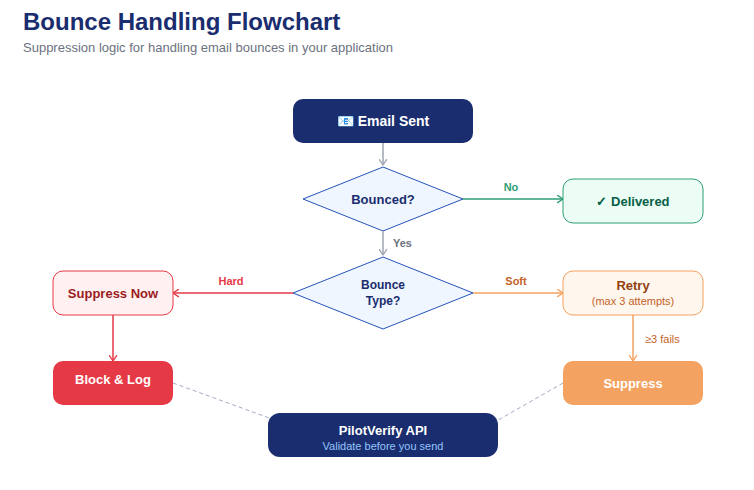
📷 Bounce handling logic: hard bounce → immediate suppression, soft bounce → retry queue → suppress after 3 failures
The Four Address Categories That Are Inflating Your Bounce Rate Right Now
Most senders are surprised to discover how many invalid addresses are hiding in plain sight on their lists. Here are the four categories bulk email validation finds that are most directly responsible for elevated bounce rates:
1. Decayed Addresses — The Biggest Culprit
List decay is the silent killer of email deliverability. An address that was completely valid at the time of signup becomes invalid when the person changes jobs and loses their work email, switches to a new personal provider, or simply abandons an old account. This process happens continuously across your entire list — roughly 22–25% of addresses go invalid every year.
A list that hasn't been cleaned in two years may have lost a quarter of its valid addresses to decay. These show up as hard bounces the moment you send to them. Bulk email validation's SMTP mailbox verification catches these by directly probing the mail server to confirm the specific mailbox still exists — without sending an actual email.
2. Typo Addresses — Invalid From Day One
Every list contains addresses that were never valid because they were typed incorrectly at the point of entry. Classic examples: user@gmial.com, name@yaho.com, email@hotmial.com. These addresses have a syntactically valid structure — they pass a basic format check — but the domain doesn't exist or the mailbox is unreachable. They've been sitting on your list generating hard bounces since the day they were added.
Bulk email validation catches these at both the syntax level (malformed addresses) and the MX/DNS level (valid syntax but non-existent domain), removing them from your send list before they have a chance to bounce again.
3. Disposable Addresses — Never Engaged, Always Risky
Disposable email addresses generated through services like Mailinator, Guerrilla Mail, and Temp Mail expire quickly and are never monitored after creation. While they don't always hard-bounce immediately (some disposable services maintain inboxes briefly), they generate zero engagement and contribute to poor sender metrics that ISPs use to assess list quality.
More critically: disposable addresses on your list drag down your engagement rate — the ratio of opens and clicks to total sends — which is one of the signals ISPs use to evaluate how inbox-worthy your email is. Removing them via bulk email validation improves both your bounce rate and your engagement rate simultaneously.
4. Catch-All Domain Addresses — The Hidden Bounce Risk
Catch-all domains are configured to accept all incoming email at the SMTP level, even for mailboxes that don't exist. During a basic verification check, these domains appear valid — they respond positively to every probe. But after your email is accepted, it's often silently discarded or returned as a bounce after the fact.
This post-acceptance bounce is more damaging than a straightforward upfront rejection because it consumes your sending resources and still registers as a bounce in your metrics. Bulk email validation flags catch-all domains specifically so you can make an informed decision about whether to include them in your blast or send to them in a controlled test segment first.
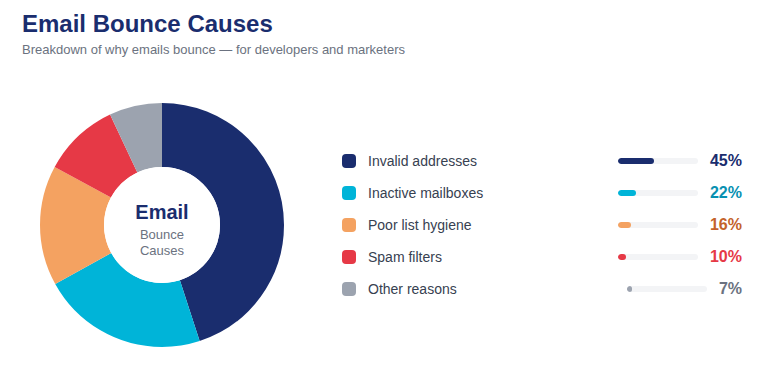
📷 Breakdown: the percentage contribution of each invalid address type to a typical elevated bounce rate
Step-by-Step: How to Cut Your Bounce Rate With Bulk Email Validation
Here is the exact workflow to cut your bounce rate before your next send using PilotVerify.
Step 1: Pull Your Full Active List
Export your complete send list from your ESP or CRM as a CSV. Include all contacts you intend to mail — not just a segment. If you're running a list hygiene project for the first time, you want to catch every invalid address across your full database, not just the segment you happen to be sending to this week.
Step 2: Upload and Run Bulk Email Validation
Upload your CSV to the PilotVerify dashboard under Bulk Validation. Confirm the email column and enable SMTP mailbox verification — this is the check that catches decayed mailboxes that syntax and domain checks alone cannot identify. For bounce rate reduction specifically, SMTP verification is the most important layer in the stack.
Step 3: Download and Segment Your Results
Your results file will contain the original data plus appended validation fields. Segment into three groups:
· VALID — your confirmed sendable list. These addresses exist, the mailboxes are active, and they are not flagged as disposable or catch-all.
· INVALID — permanent suppress. Import into your ESP suppression list before doing anything else.
· RISKY — review by reason code. Disposable and role-based addresses should be suppressed for marketing. Catch-all addresses can be tested in a small controlled segment before full deployment.
Step 4: Import Suppressions Into Your ESP
This step is where many senders drop the ball. Running validation without importing the suppressions into your ESP means the invalid addresses remain on your active list and will bounce on your next send. Always close the loop — export your INVALID segment, import it into your ESP as suppressed contacts, and verify the import completed before scheduling your campaign.
Step 5: Send to Your Validated List and Measure the Difference
Send your campaign to your validated VALID list only. After the send, compare your bounce rate to your previous campaign. For most senders running bulk email validation for the first time, the drop is immediate and significant — often more than half of the previous bounce rate, sometimes more.
Benchmark: Senders who run a full bulk email validation before their next campaign typically see bounce rates drop 60–85% compared to their previous send. A list that was bouncing at 8% often comes back at 1.2–2% after the first clean. The effect compounds — each subsequent validated send keeps the rate low.
Quick-Start: Automate Pre-Send Validation With the PilotVerify API
For teams who want to build bounce rate protection directly into their send pipeline, here's a Python example that validates a list and filters it to only sendable addresses before any campaign goes out:
# Python — Pre-send bounce rate protection via PilotVerify API
import requests

emails = [
    "subscriber@example.com",
    "ghost@olddomain.net",
    "temp1234@mailinator.com",
    "valid.user@company.com"
]

API_KEY = "[YOUR_API_KEY]"
ENDPOINT = "https://pilotverify.net/api/validate"

valid_list = []
suppressed_list = []

for email in emails:
    response = requests.post(
        ENDPOINT,
        headers={
            "Content-Type": "application/json",
            "x-api-key": API_KEY
        },
        json={"email": email}
    )
    result = response.json()

    if result.get("status") == "VALID":
        valid_list.append(email)
    else:
        suppressed_list.append({
            "email": email,
            "reason": result.get("reason")
        })

print(f"Ready to send: {len(valid_list)}")
print(f"Suppressed: {len(suppressed_list)}")
# Pass valid_list to your ESP send function
For large lists, use the CSV bulk upload in the PilotVerify dashboard or the batch API endpoint. Documentation at docs.pilotverify.net.
How to Keep Your Bounce Rate Low After the First Clean
Cutting your bounce rate with bulk email validation is straightforward. Keeping it low requires a small amount of ongoing discipline. Here's what that looks like in practice:
Validate at the Point of Capture
Every new address entering your database is a potential future bounce. Connecting a real-time email verification API to your signup forms, checkout pages, and any other capture point stops invalid addresses from entering your list in the first place. PilotVerify's API returns a verification result in under 100ms — fast enough to validate silently during form submission with no user-visible delay.
Re-Validate Before Every Major Campaign
Bulk email validation is not a one-time event. List decay is ongoing. Even with real-time verification running at every capture point, addresses that were valid when added will decay over time. Run bulk email validation on your full active list before every significant send — or at minimum, every 90 days for high-frequency senders.
Sunset Chronically Inactive Subscribers
Subscribers who haven't opened or clicked in 12 months or more are likely candidates for list decay. Before each major campaign, run a re-engagement sequence for this segment. Those who don't respond should be removed or suppressed — they're diluting your engagement metrics and increasing your risk of bounces and spam complaints over time.
Monitor Your Bounce Rate as a Leading Indicator
Don't wait for your ESP to flag your account before taking action. After every send, check your bounce rate breakdown — hard bounces vs. soft bounces, and the specific domains generating the most failures. A creeping increase in bounce rate over consecutive sends is an early warning sign that list decay is outpacing your hygiene practices. Run bulk email validation immediately when you see the trend forming.
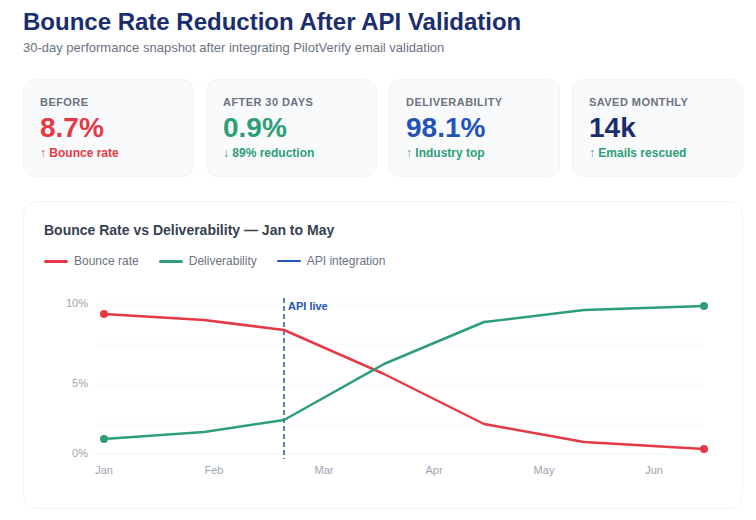
📷 Dashboard showing bounce rate trend dropping from 8% to 1.2% over 3 sends after implementing bulk email validation
The Compounding Benefit: What Happens After Consecutive Validated Sends
The bounce rate reduction from bulk email validation doesn't plateau after one send. It compounds.
Here's why: a lower bounce rate improves your sender reputation score with ISPs. A better sender reputation improves your inbox placement rate — the percentage of emails that land in the inbox rather than the spam folder. Higher inbox placement means more of your emails are seen, opened, and engaged with. Higher engagement further reinforces your sender reputation. The cycle is self-reinforcing and it all starts with the first validated send.
Senders who maintain consistent bulk email validation as part of their pre-send workflow typically see:
· Hard bounce rates stabilize below 0.5% within 2–3 send cycles
· Inbox placement rates improve by 10–30 percentage points as sender reputation recovers
· Open rates increase as a higher percentage of sends actually reach engaged inboxes
· Spam complaint rates decline as disposable and role-based addresses are removed from the list
Every one of these improvements starts from the same action: running bulk email validation before the send.
Frequently Asked Questions (FAQ)
Q: How much will my bounce rate actually drop after bulk email validation?
A: Results vary depending on how long your list has gone without cleaning, but most senders see a 60–85% reduction in bounce rate on their very next send after a full validation run. Lists that haven't been cleaned in 12+ months typically see the most dramatic improvement.
Q: My bounce rate is already at 2% — do I still need bulk email validation?
A: Yes. A 2% bounce rate is at the top of the acceptable range — one bad send away from the warning zone. Bulk email validation keeps you well under that threshold consistently, rather than hovering at the edge. It also improves engagement metrics and sender reputation beyond what bounce rate alone reflects.
Q: Will removing invalid addresses hurt my list size metrics?
A: Your list will be smaller in raw number terms, but every address that remains is a real, deliverable contact. A list of 30,000 validated addresses outperforms a list of 40,000 unvalidated ones on every metric that matters: open rate, click rate, conversion rate, and deliverability.
Q: Can bulk email validation fix a damaged sender reputation?
A: It's the essential first step. Cleaning your list stops the ongoing reputation damage caused by hard bounces. Reputation recovery itself takes consistent clean sending over time — but it cannot begin until the source of the bounces is removed. Bulk email validation starts that recovery process immediately.
Q: How long before my send should I run bulk email validation?
A: Within 30 days of your intended send date for maximum accuracy. Addresses that are valid at verification time can still decay — the closer your validation is to your actual send, the more precisely your results reflect current deliverability.
Q: What pricing plan makes sense for pre-campaign list cleaning?
A: It depends on your list size and send frequency. PilotVerify's Scale plan ($125 for 125,000 credits at $1.00 per 1,000) is the most cost-effective for senders cleaning large lists regularly. Credits never expire, so you can buy in volume without pressure to use them by a deadline. For smaller lists or occasional cleaning, the Starter ($25 / 5,000 credits) or Professional ($75 / 25,000 credits) tiers work well.
Your Next Send Can Be Different
A high bounce rate is not a permanent condition. It's a data quality problem — and data quality problems have direct, concrete solutions. Bulk email validation is that solution. It finds every address that will bounce before you send, removes it from your list, and lets you send to only the contacts who will actually receive your email.
The result is immediate: a lower bounce rate on your very next campaign. The compounding effect is what makes it non-negotiable long-term: better sender reputation, higher inbox placement, more engaged subscribers, and an email program that actually delivers on its potential.
Run your list through PilotVerify before your next send. See the difference in your bounce rate. Then make it part of every campaign going forward.
Try PilotVerify Free — Start cutting your bounce rate today at pilotverify.net