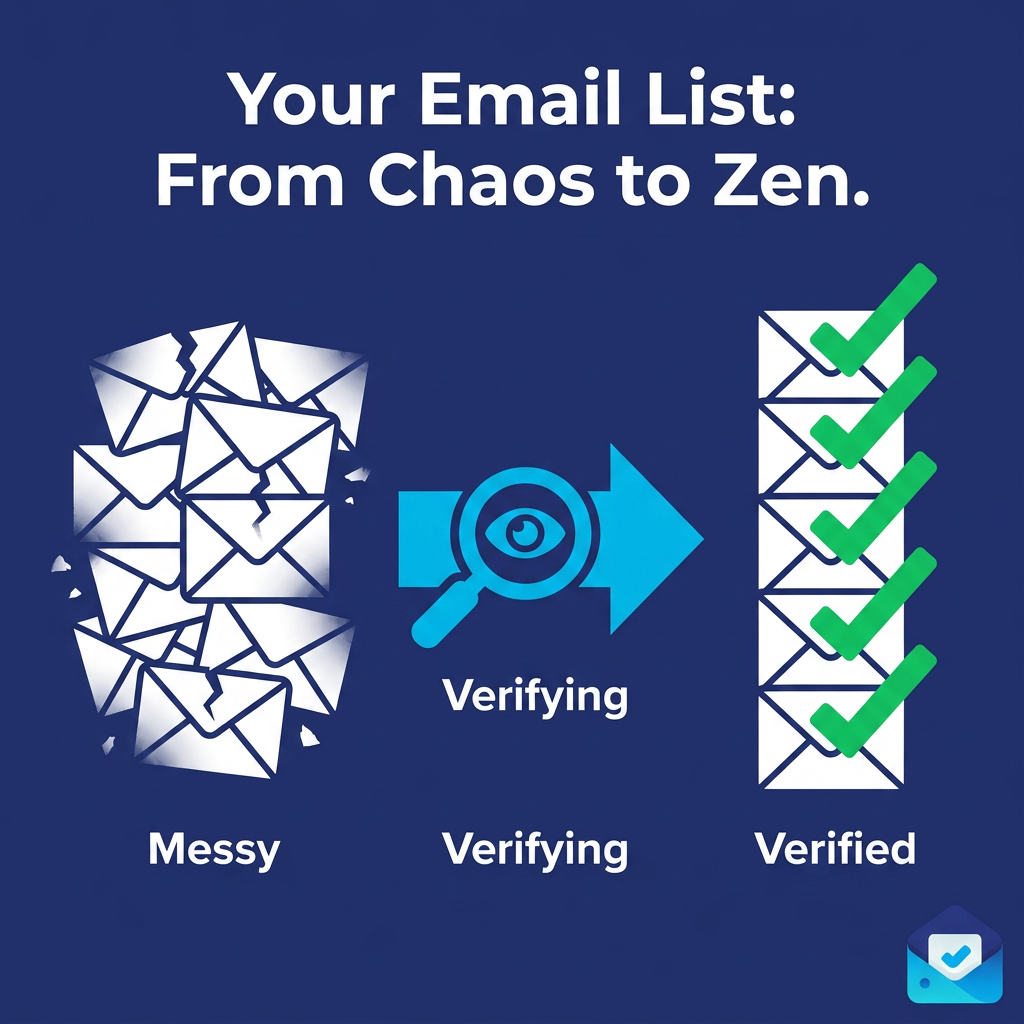
Why Bulk Email Verification Is Non-Negotiable Before Your Next Email Blast
Most email blasts fail before they're even sent. Here's why bulk email verification is the one step you can't skip — and how to do it right before your next campaign.
You've written the copy. You've designed the template. Your offer is dialed in and your send time is scheduled. Everything looks ready for your next email blast.
But there's one question most senders never ask before they hit send: how many of those email addresses are actually real?
If you can't answer that with certainty, you're gambling with your sender reputation, your ESP account, and the deliverability of every future campaign you send. Bulk email verification is the step that removes that uncertainty — entirely. It's not optional. It's not something you do once and forget. And in 2026, with inbox providers enforcing stricter standards than ever, skipping it before an email blast is one of the most expensive mistakes a marketer or developer can make.
This guide explains exactly why bulk email verification is non-negotiable before your next email blast, what it catches that other safeguards miss, and how to build it into your pre-send workflow permanently.
22–25% of email addresses in any list go invalid every year — making bulk email verification before every blast essential, not optional (2026 Email Benchmarks Report)
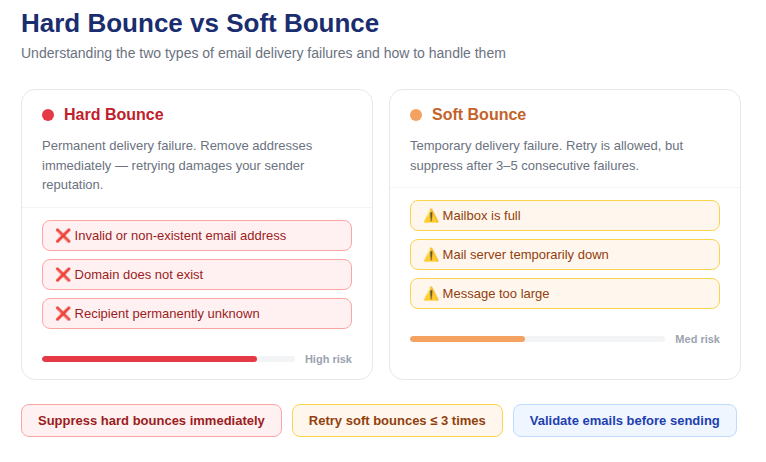
📷 Visual overview: what happens to your email blast without bulk email verification vs. with it
What Is Bulk Email Verification?
Bulk email verification is the process of running an entire list of email addresses through a multi-layer validation engine before sending to them. Rather than checking one address at a time, bulk verification processes your full list simultaneously — identifying which addresses are deliverable, which are invalid, and which pose a risk to your sender reputation.
The checks performed during bulk email verification include:
· Syntax validation — confirms the address is correctly formatted per RFC 5322
· MX/DNS record lookup — confirms the domain has active mail servers capable of receiving email
· Disposable email detection — flags throwaway addresses from services like Mailinator and Temp Mail
· SMTP mailbox verification — connects directly to the mail server to confirm the specific mailbox exists
· Catch-all domain detection — identifies domains that accept all email regardless of mailbox existence
· Role-based address detection — flags addresses like info@, support@, and admin@ that carry elevated complaint risk
The result is a segmented list: Valid addresses safe to send to, Invalid addresses to suppress immediately, and Risky addresses to handle with informed judgment. Every email blast should go out only to the Valid segment.
Why Your Email Blast Is Already at Risk
Here's the problem most senders don't realize until it's too late: your list is decaying right now, even if you're not sending to it.
Email addresses go invalid constantly. People change jobs and lose their work email. They abandon old personal accounts. They switch providers. A subscriber who was genuinely active eighteen months ago may have an address that hard-bounces today. This is called list decay, and it happens at a rate of approximately 22–25% per year across all industries.
That rate isn't hypothetical. It means that a list of 40,000 subscribers you built over the past two years could have up to 20,000 addresses that no longer work. Send an email blast to that list without running bulk email verification first, and you're looking at a potential bounce rate of 10% or higher — enough to get your ESP account flagged, throttled, or suspended on the first send.
And list decay is only one part of the problem. The others compound it:
· Typos entered at signup that passed without validation (gmial.com, yaho.com)
· Disposable addresses used to access gated content, now completely abandoned
· Contacts imported from trade shows, webinars, or purchased lists with unknown quality
· Catch-all domains that accepted your verification probe but silently discard actual emails
None of these problems are visible until you send. By then, the damage to your sender reputation is already happening in real time.
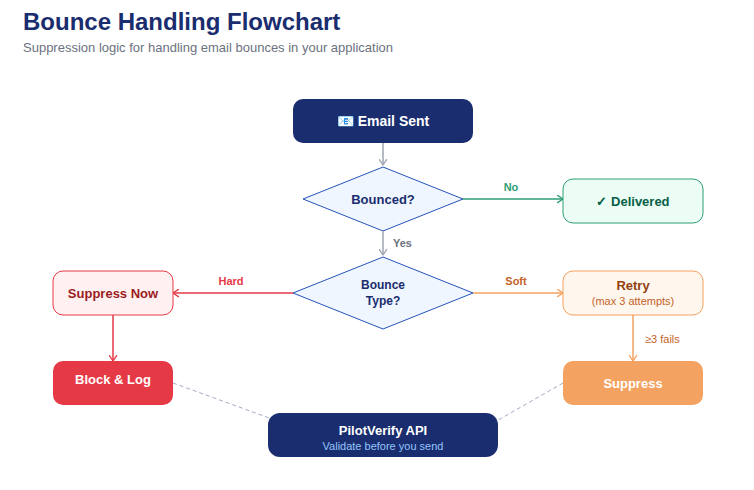
📷 Flowchart: how unverified email blasts trigger bounce spikes, spam flags, and ESP account warnings
What Happens When You Skip Bulk Email Verification
Skipping bulk email verification before an email blast doesn't just mean a few extra bounces. The consequences cascade across every part of your email program.
Your Bounce Rate Spikes
Hard bounces are permanent delivery failures — the email address doesn't exist, the domain is dead, or the receiving server has permanently rejected you. Every hard bounce you generate signals to ISPs that you're sending to bad data. Industry benchmarks set the danger threshold at 2% total bounce rate. Above 5%, your sender reputation is actively degrading. Above 10%, most ESPs will intervene directly.
A single unverified email blast to a decayed list can push you past all three thresholds simultaneously.
Your Sender Reputation Takes Lasting Damage
Sender reputation is not a single number — it's a composite score that ISPs like Google, Microsoft, and Yahoo calculate based on your bounce rate, spam complaint rate, engagement rate, authentication status, and sending patterns over time. A spike in any one of these metrics damages the whole score.
The worst part: reputation damage is slow to recover. You can clean your list after a bad send, but rebuilding the trust that ISPs had in your sending domain takes weeks or months of consistent, clean sending. Bulk email verification before the blast prevents the damage from happening in the first place.
You Risk Hitting Spam Traps
Spam traps are email addresses set up specifically to catch senders using bad lists. There are two types: pristine spam traps (addresses that have never opted in to anything and exist only to catch senders who scraped or purchased lists) and recycled spam traps (formerly valid addresses that were abandoned, went invalid, and were then repurposed as traps by ISPs).
Hitting a spam trap — even once — can trigger immediate blacklisting of your sending IP or domain. Bulk email verification significantly reduces spam trap exposure by removing addresses that have gone invalid before they've had time to be repurposed.
Your ESP Account Gets Flagged
Every major email service provider — Mailchimp, SendGrid, HubSpot, ActiveCampaign — monitors bounce rates and spam complaint rates on your account. Exceed their thresholds and you'll receive warnings, sending restrictions, or full account suspension. Recovering a suspended ESP account is time-consuming, disruptive, and sometimes impossible without migrating to a new platform entirely.
Your Valid Subscribers Stop Seeing Your Emails
This is the consequence that hurts the most: the subscribers who genuinely want your emails stop receiving them. A damaged sender reputation means inbox providers start routing your messages to spam — for everyone on your list, including engaged subscribers who never bounced and never complained. Your deliverability problem becomes invisible to metrics until open rates collapse.
Why Basic Safeguards Aren't Enough
Many senders assume their existing safeguards are handling this problem. They're usually wrong. Here's what common safeguards miss:
Frontend Email Format Validation
Checking that a submitted address contains an @ symbol and a domain is not email verification. It catches only the most obvious formatting errors. It misses typos like user@gmial.com (syntactically valid, definitely wrong), completely invalid domains, and any address that looks correct but belongs to a non-existent or abandoned mailbox.
ESP Bounce Suppression
Your ESP suppresses addresses that have previously hard-bounced on your account. But this is reactive, not preventive. The damage — the bounces, the reputation signals — already happened before suppression kicks in. And suppression only covers addresses you've already sent to. It does nothing for addresses you've never mailed before that are already invalid.
Double Opt-In
Double opt-in confirms that an address was valid and accessible at the moment of signup. It does not protect against list decay. An address that confirmed opt-in two years ago may hard-bounce today. Double opt-in is an excellent practice for list quality at the point of entry — but it's not a substitute for pre-send bulk email verification.
💡 Developer Tip: The most complete defense combines real-time email verification at the point of capture (to stop bad addresses entering your database) with bulk email verification before every send (to catch addresses that have decayed since they were added). Neither alone is sufficient.
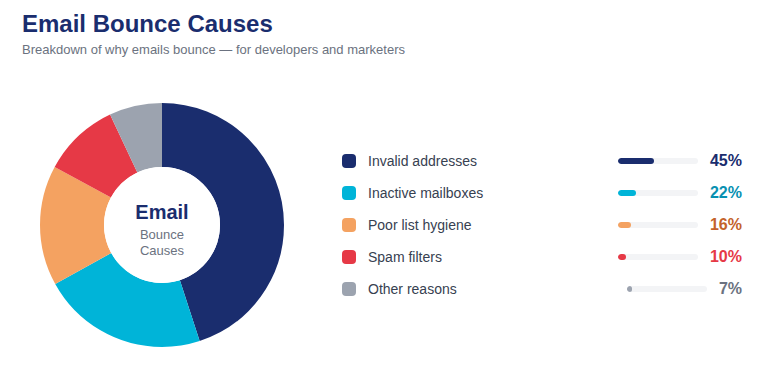
📷 Pie chart: percentage breakdown of invalid address types found in a typical pre-blast verification run
The 6 Types of Problem Addresses Bulk Email Verification Catches
Understanding what bulk email verification actually finds helps you appreciate why it's irreplaceable in a pre-blast workflow.
1. Syntactically Invalid Addresses
These are addresses that fail basic RFC 5322 formatting rules — missing @, double dots, invalid characters, or incomplete domain structures. They will always bounce and should be removed unconditionally. Common sources: manual data entry, form submissions without validation, and data imports from spreadsheets where formatting errors slipped through.
2. Dead Domain Addresses
The domain portion of the address exists in the email but has no active MX records — meaning there is no mail server capable of receiving messages for that domain. This happens when companies shut down, rebrand, or migrate to new domains without forwarding. No amount of retry logic will deliver to a dead domain.
3. Non-Existent Mailboxes
The domain is valid and the mail server is active, but the specific mailbox doesn't exist. This is the largest category of invalid addresses in most lists and the one that only SMTP-level verification can catch. These are former employees whose accounts were deleted, users who abandoned an address after switching providers, and anyone who gave a plausible-looking address that was never real.
4. Disposable Email Addresses
Generated through services like Mailinator, Guerrilla Mail, or Temp Mail, these addresses are created specifically to avoid giving out a real inbox. They expire quickly, are never monitored, and generate zero engagement. Including them in an email blast wastes credits and dilutes your engagement metrics, making your list appear less active than it is.
5. Catch-All Domain Addresses
Catch-all domains accept every incoming email at the SMTP level regardless of whether the specific mailbox exists. During verification, these domains return a positive response to every probe — making the address appear valid when it may not be. Emails sent to non-existent mailboxes on catch-all domains are silently discarded or returned as bounces after acceptance, which is even more damaging to reputation than an upfront rejection.
6. Role-Based Addresses
Addresses like info@, hello@, admin@, sales@, and noreply@ are not tied to individual people. They're often monitored by multiple team members, have low engagement rates, and are disproportionately likely to generate spam complaints when marketing emails arrive. Bulk email verification flags these so you can make an informed decision before including them in a blast.
How to Run Bulk Email Verification Before Your Next Blast
The process is straightforward. Here's exactly how to do it using PilotVerify:
Step 1: Export Your List as a CSV
Export your full send list from your ESP or CRM as a CSV file. The file should contain at minimum your email address column. Additional columns like first name, last name, and custom fields can be included — they'll pass through the verification process unchanged so you can reimport results directly.
Step 2: Upload to PilotVerify
Log in to your PilotVerify dashboard and navigate to Bulk Validation. Upload your CSV, confirm which column contains email addresses, and configure your settings. For pre-blast verification where accuracy is paramount, always enable SMTP mailbox verification — it catches the largest class of invalid addresses that syntax and MX checks alone will miss.
Step 3: Review Your Results
Once processing is complete, you'll receive a results CSV with the following fields appended to each row:
· status — VALID, INVALID, or RISKY
· reason — specific reason code (e.g. mailbox_not_found, disposable_provider, catch_all_domain)
· syntaxValid — Boolean
· mxRecordExists — Boolean
· isDisposable — Boolean
· isCatchAll — Boolean
· smtpValid — Boolean
· creditsRemaining — your remaining credit balance
Step 4: Apply Results to Your Send List
· INVALID — Add to your ESP suppression list immediately. Do not send.
· RISKY / disposable — Suppress for marketing. Consider sending transactional only.
· RISKY / catch-all — Send to a small test segment first; monitor bounce data before mailing the full segment.
· RISKY / role-based — Suppress for marketing campaigns.
· VALID — Send with confidence.
Step 5: Send Your Blast
Import your cleaned VALID list back into your ESP and send. With a freshly verified list, you'll see materially lower bounce rates from the first send — and the sender reputation benefit compounds with every subsequent campaign.
Quick-Start: Integrating Bulk Email Verification via API
For developers building automated pre-blast pipelines, here's how to validate a batch of email addresses programmatically using the PilotVerify API:
// Node.js — Pre-blast email verification pipeline
const fs = require('fs');
const fetch = require('node-fetch');

const emails = [
  'subscriber@example.com',
  'test@mailinator.com',
  'info@company.com',
  'user@invaliddomain.xyz'
];

async function preSendVerification(emails) {
  const valid = [];
  const suppressed = [];

  for (const email of emails) {
    const response = await fetch('https://pilotverify.net/api/validate', {
      method: 'POST',
      headers: {
        "Content-Type": "application/json",
        "x-api-key": "[YOUR_API_KEY]"
      },
      body: JSON.stringify({ email })
    });

    const result = await response.json();

    if (result.status === 'VALID') {
      valid.push(email);
    } else {
      suppressed.push({ email, reason: result.reason });
    }
  }

  console.log(`Ready to send: ${valid.length}`);
  console.log(`Suppressed: ${suppressed.length}`);
  return { valid, suppressed };
}

preSendVerification(emails);
For large lists, use the CSV bulk upload via the PilotVerify dashboard or the batch API endpoint. Full API documentation is available at docs.pilotverify.net.
📷 PilotVerify dashboard showing pre-blast verification results: valid, invalid, and risky address breakdown with downloadable cleaned list
How Often Should You Run Bulk Email Verification?
The short answer: before every email blast, without exception. But the right cadence depends on your send frequency and list growth rate.
· Before every campaign — non-negotiable for any sender. Especially critical if more than 30 days have passed since your last send or your last verification run.
· Monthly — recommended for high-frequency senders (weekly or more) who need ongoing hygiene between major campaigns.
· After every large import — any time you add contacts from an external source, verify before those contacts are included in a blast.
· After long sending gaps — if you haven't sent in 3+ months, treat your entire list as unverified and run a full audit before resuming.
Best Practice: Validate within 30 days of your intended send date for maximum accuracy. Addresses that were valid at verification time can still decay — the closer your verification is to your send date, the more accurate your results will be.
Bulk Email Verification and Sender Authentication: A Complete Pre-Blast Checklist
Bulk email verification protects your list quality. But list quality is only one part of deliverability. Before every email blast, run through this complete checklist:
· ✅ Run bulk email verification on your send list — remove INVALID, segment RISKY
· ✅ Confirm SPF record is published and covers your sending IP
· ✅ Confirm DKIM signing is enabled on your sending domain
· ✅ Confirm DMARC policy is published (at minimum p=none with reporting enabled)
· ✅ Check your domain reputation in Google Postmaster Tools before large sends
· ✅ Review your suppression list — ensure all previous hard bounces and unsubscribes are excluded
· ✅ Segment and suppress inactive subscribers (no opens or clicks in 12+ months)
· ✅ Test your email content for spam trigger words and rendering issues before send
Bulk email verification is the first and most impactful item on this list. Everything else is optimization. List quality is the foundation.
What to Expect After Your First Bulk Email Verification Run
If you've never run bulk email verification on your list before, the results of your first run may be surprising. Most unverified lists contain:
· 3–8% outright invalid addresses (non-existent mailboxes, dead domains, syntax errors)
· 2–5% disposable or role-based addresses
· 5–15% catch-all addresses of uncertain deliverability
That means a significant portion of your list — potentially 10–28% — should either be removed or handled with extra care before your next blast. Discovering this before sending is the entire point. The alternative is discovering it through a bounce spike during a campaign, at which point the reputation damage is already done.
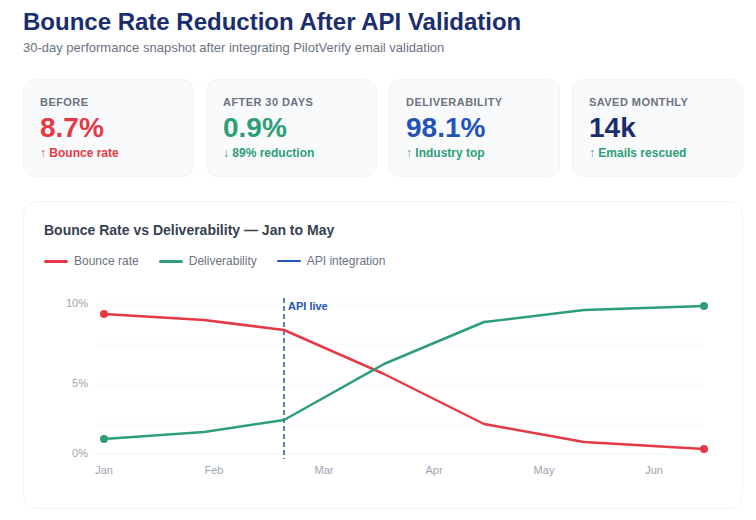
Benchmark: After a full verification run and suppression of invalid addresses, most senders see their bounce rate drop by 60–85% on the very next send. For senders who also implement real-time verification at the point of capture going forward, bounce rates typically stabilize below 1% within two send cycles.
Frequently Asked Questions (FAQ)
Q: Does bulk email verification slow down my send schedule?
A: No. Small lists process in seconds to minutes. Even large lists of 100,000+ addresses typically complete within an hour. Build verification into your pre-send timeline — 24 hours before your scheduled blast is more than enough buffer for any list size.
Q: Will bulk email verification catch every possible bounce?
A: It eliminates the vast majority — invalid syntax, dead domains, non-existent mailboxes, and disposable addresses are all caught. It cannot prevent addresses that go invalid after verification (list decay between verify and send), which is why verifying within 30 days of your send date matters.
Q: What's the cost of bulk email verification vs. the cost of not doing it?
A: With PilotVerify, verification costs as little as $0.60 per 1,000 emails at scale. The cost of not verifying — ESP account suspension, domain blacklisting, reputation recovery — is orders of magnitude higher and takes weeks or months to reverse.
Q: Can I verify emails one at a time instead of in bulk?
A: Yes — PilotVerify supports both single-address verification via the API (ideal for real-time signup validation) and bulk CSV verification via the dashboard or batch API endpoint. For pre-blast cleaning, bulk is the right tool.
Q: Is my list data safe during bulk email verification?
A: With PilotVerify, yes. All data is encrypted at rest, email addresses are automatically purged after 90 days, and your data is never sold or shared with third parties.
Q: How is bulk email verification different from real-time email verification?
A: Bulk verification processes an existing list all at once — it's your pre-send tool. Real-time verification checks a single address at the moment it's submitted, such as at a signup form. Both use the same underlying checks. Used together, they provide complete protection: real-time stops bad addresses at entry, bulk catches decay before every blast.
Q: Do credits expire if I buy in bulk?
A: No. PilotVerify credits never expire. You can buy in volume at the best rate and use them at whatever pace matches your send schedule — no pressure to use them by a deadline.
There Is No Good Reason to Skip It
Bulk email verification is fast. It's affordable. It integrates directly into your existing pre-send workflow with no technical complexity. And the downside of skipping it — damaged sender reputation, ESP account suspension, blacklisted domains, and collapsed deliverability for your engaged subscribers — far outweighs any argument for skipping it.
Before your next email blast, run your list. Remove the invalids. Segment the risky addresses. Send only to verified, deliverable contacts. Then do it again before the blast after that.
PilotVerify makes it simple: 99.6% accuracy, results in under 100ms for single verifications, CSV bulk upload for lists of any size, detailed reason codes for intelligent segmentation, pay-as-you-go pricing with credits that never expire, and enterprise-grade data privacy built in.
Try PilotVerify Free — Verify your list before your next blast at pilotverify.net